or scan the QR code with your camera

For conveyancing attorneys who train estate agents

Find out who was listening.

Ace by FIFO runs the training you give estate agents, from the moment they scan in to the certificate they take home. No paper register, no certificates to make by hand, and a record of who learned what.

R6,000 a year for your firm, excl. VAT. No fee per agent, per session or per presenter.

Already on the FIFO Law calculator? Every agent you train is offered your app before they leave.

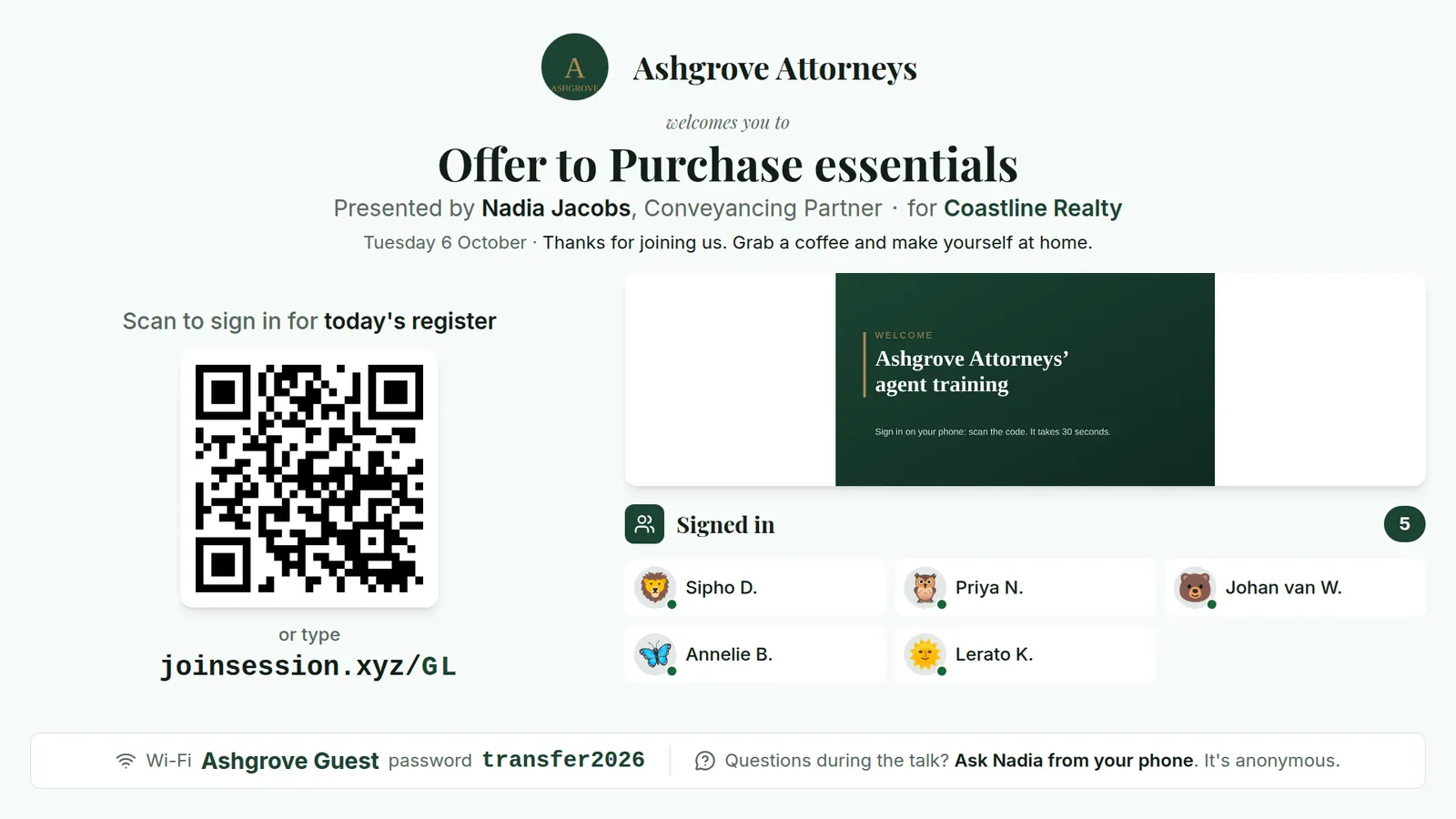
The agency's TV while agents arrive: Ashgrove Attorneys welcomes you to Offer to Purchase essentials, presented by Nadia Jacobs for Coastline Realty, with a QR code to sign in for today's register, the joinsession.xyz address with the session's code, a welcome slide, five agents signed in and the venue Wi-Fi.
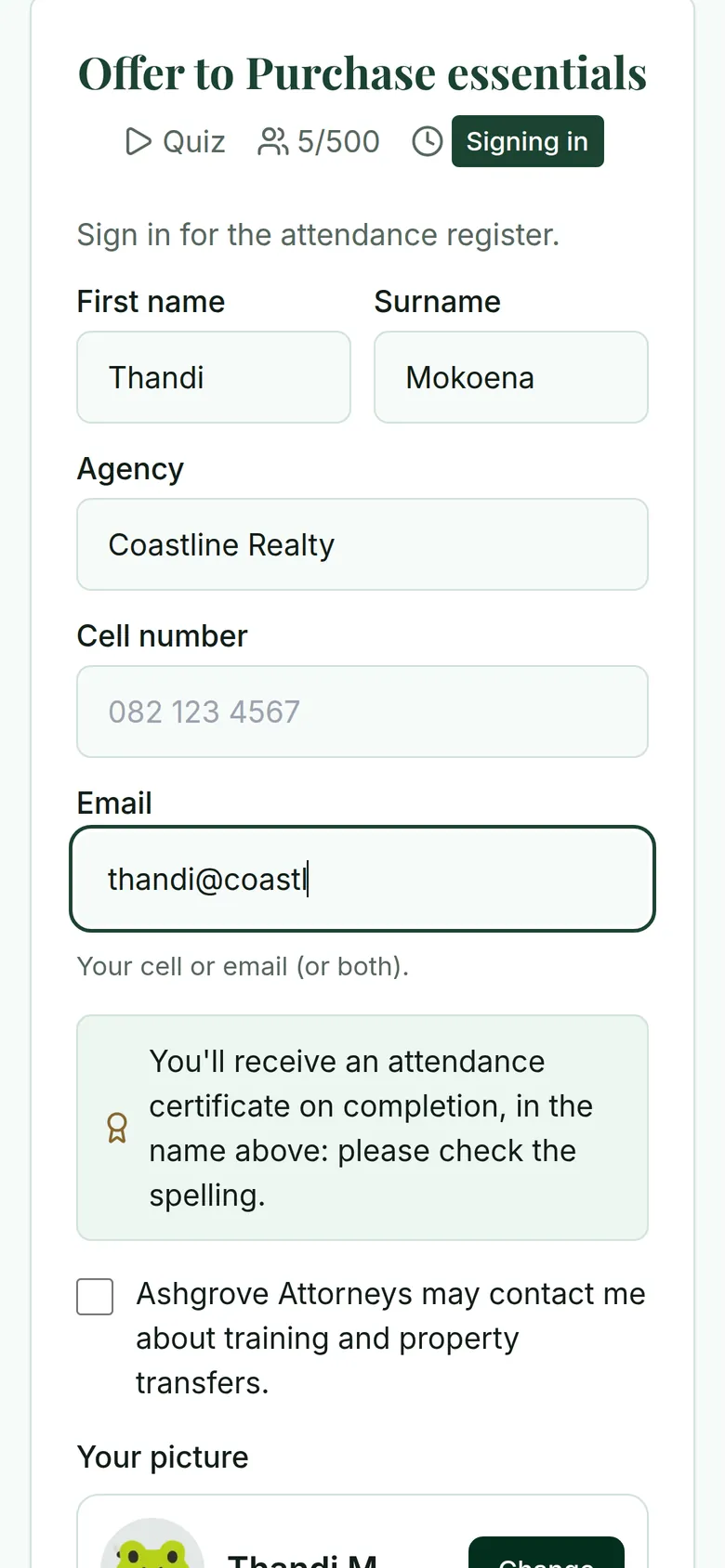
An agent's phone signing in for the register: first name Thandi, surname Mokoena, agency Coastline Realty, a cell number or email, and a tick box to agree that the firm may contact them.
The agency's TV while agents arrive, and an agent signing in. Ashgrove Attorneys is our made-up demo firm.

Before. The sheet that goes round the room

With Ace by FIFO. Agents sign in on their phones

Attendance registerOffer to Purchase essentials
Fri 2 Oct 2026 · Coastline Realty
An example register filled in by Ace by FIFO: eight agents, their agency, when they signed in and their quiz score
No.NameAgencySigned inQuiz
01Thandi MokoenaCoastline Realty08:2486%
02Johan van WykOakridge Properties08:2671%
03Priya NaidooCoastline Realty08:2786%
04Sipho DlaminiOakridge Properties08:29100%
05Annelie BothaCoastline Realty08:3171%
and 3 more, one of them a walk-in
06Lerato KhumaloOakridge Properties08:3357%
07Ruan PretoriusCoastline Realty08:4171%
08Fatima IsaacsCoastline Realtywalk-in–

8 present: 7 signed in on their own phones, 1 added by the presenter.

Agent training without the paperwork

No register passed around. Scanning in is the register.

No afternoon making certificates. Every agent downloads theirs before they leave.

No guessing. You see who was with you and what to explain again.

1.

The paperwork does itself

No typing up the register, no afternoon making certificates: every document is ready when the training ends, with your logo and colours. These samples come from Ashgrove Attorneys, our made-up demo firm.

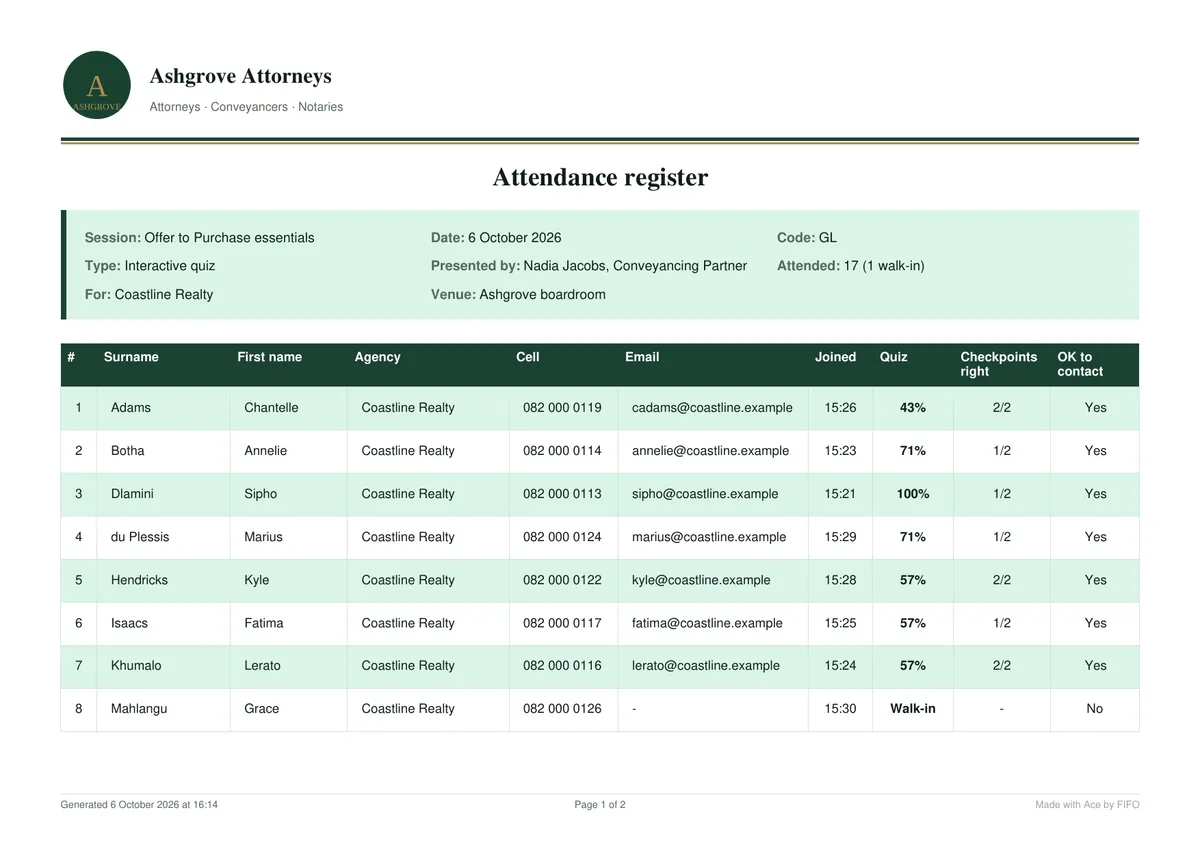
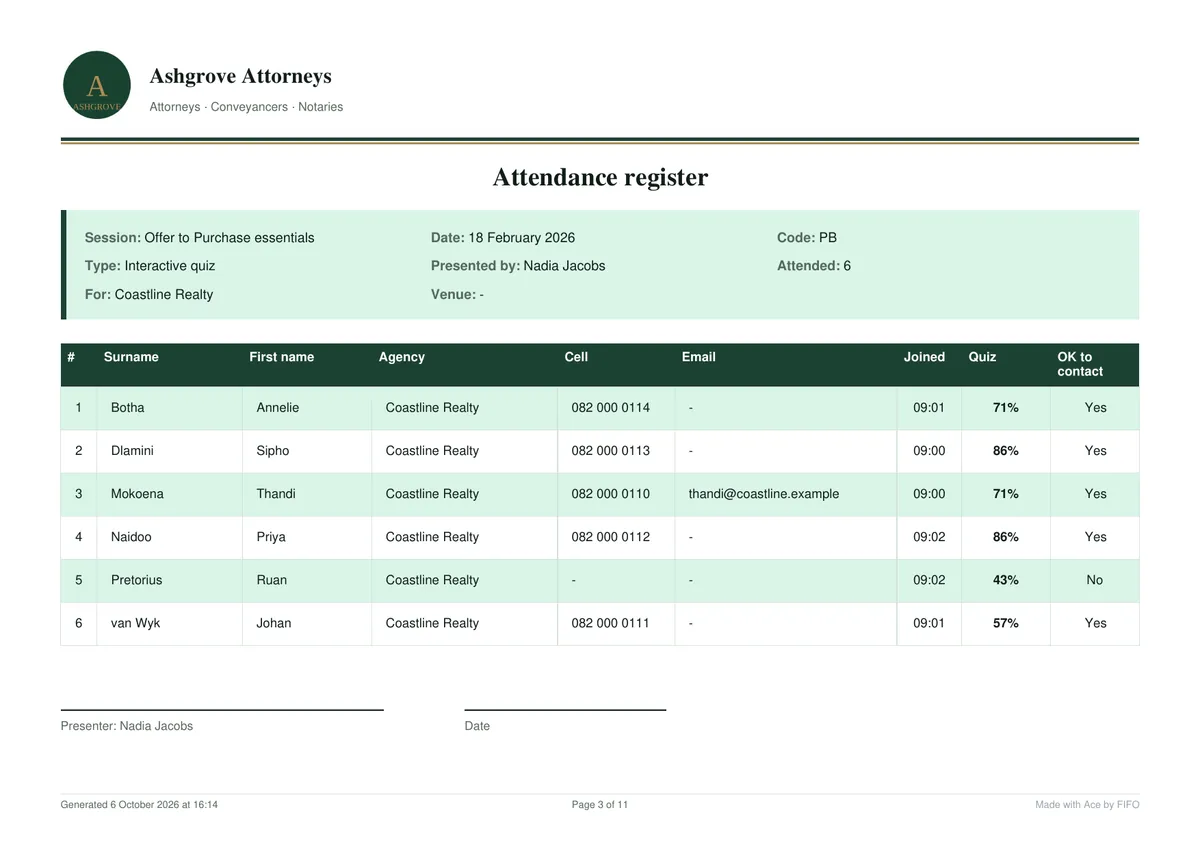
Annexure A, attendance register: the agents from Coastline Realty with their cell, email, the time they joined, quiz score, checkpoints and whether they agreed to be contacted; one walk-in.
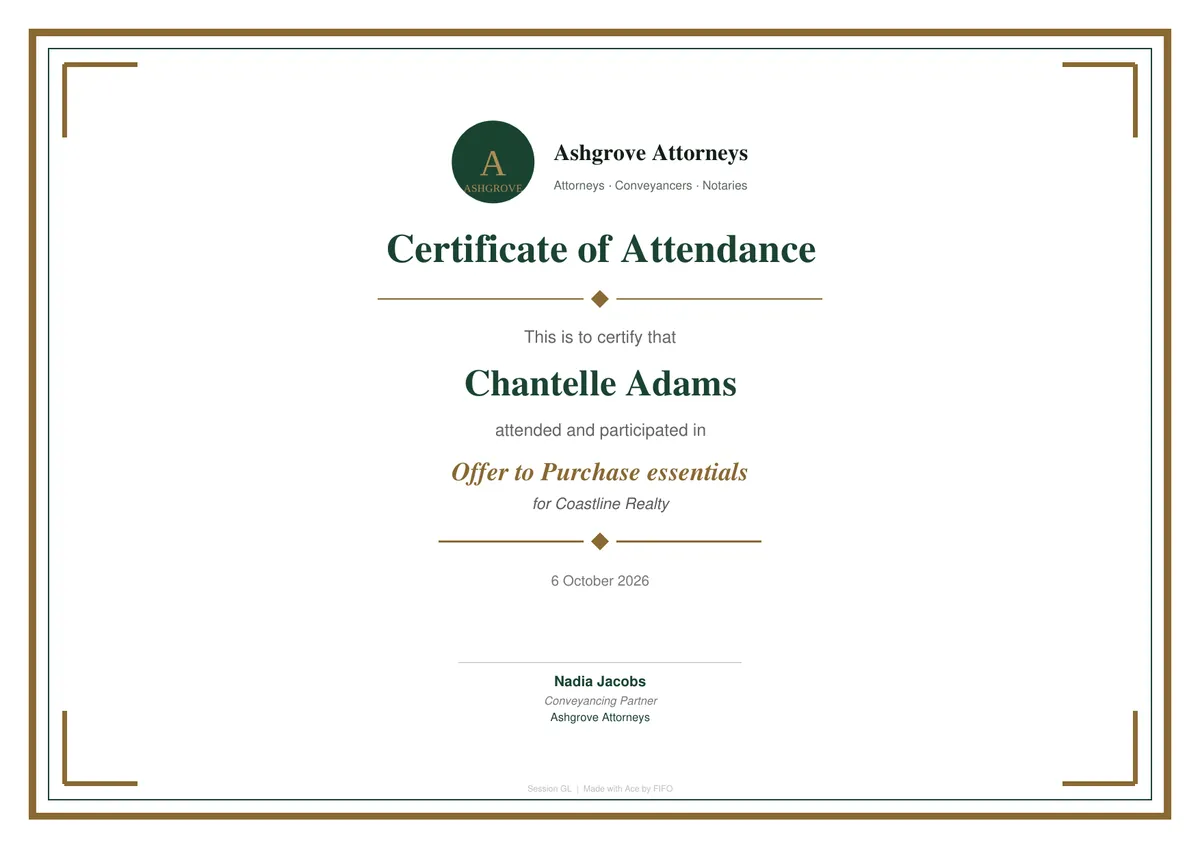
Annexure B, certificate of attendance: Chantelle Adams attended and participated in Offer to Purchase essentials for Coastline Realty, signed by Nadia Jacobs of Ashgrove Attorneys.
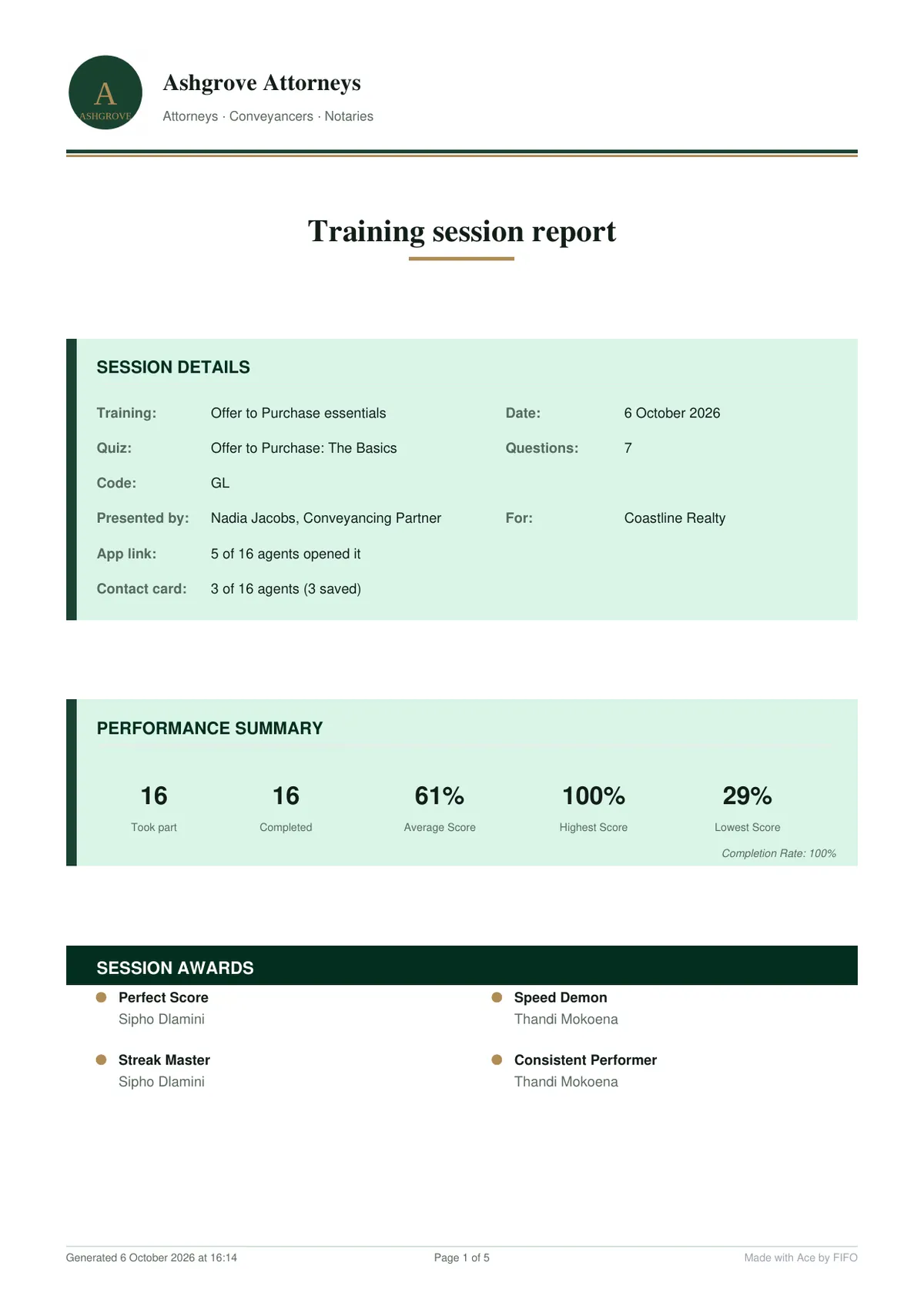
Annexure C, training session report: the session's details, a performance summary and the session's awards.
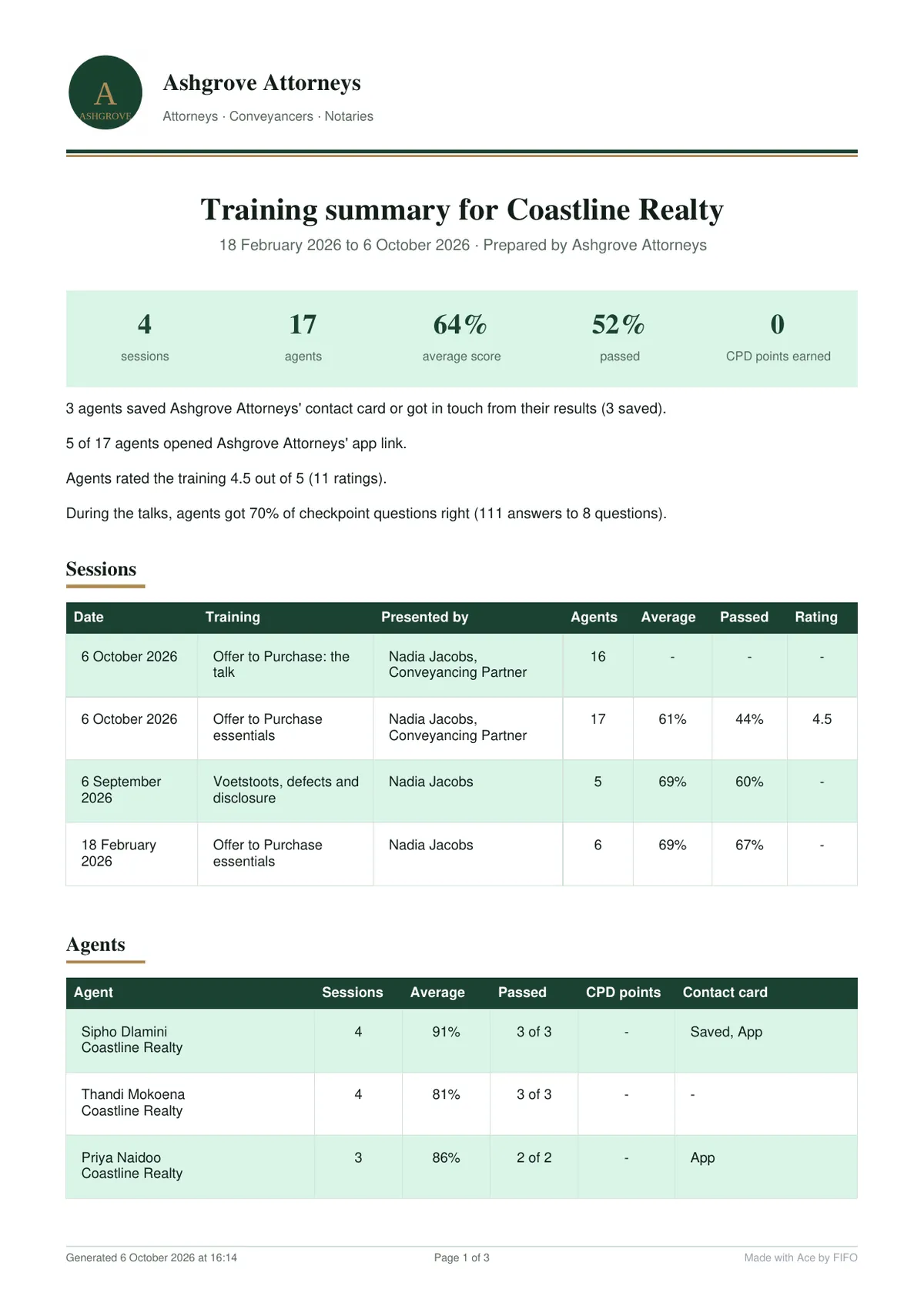
Annexure D, training summary for Coastline Realty: three sessions and 17 agents, the average score and how many passed, then every session and every agent.
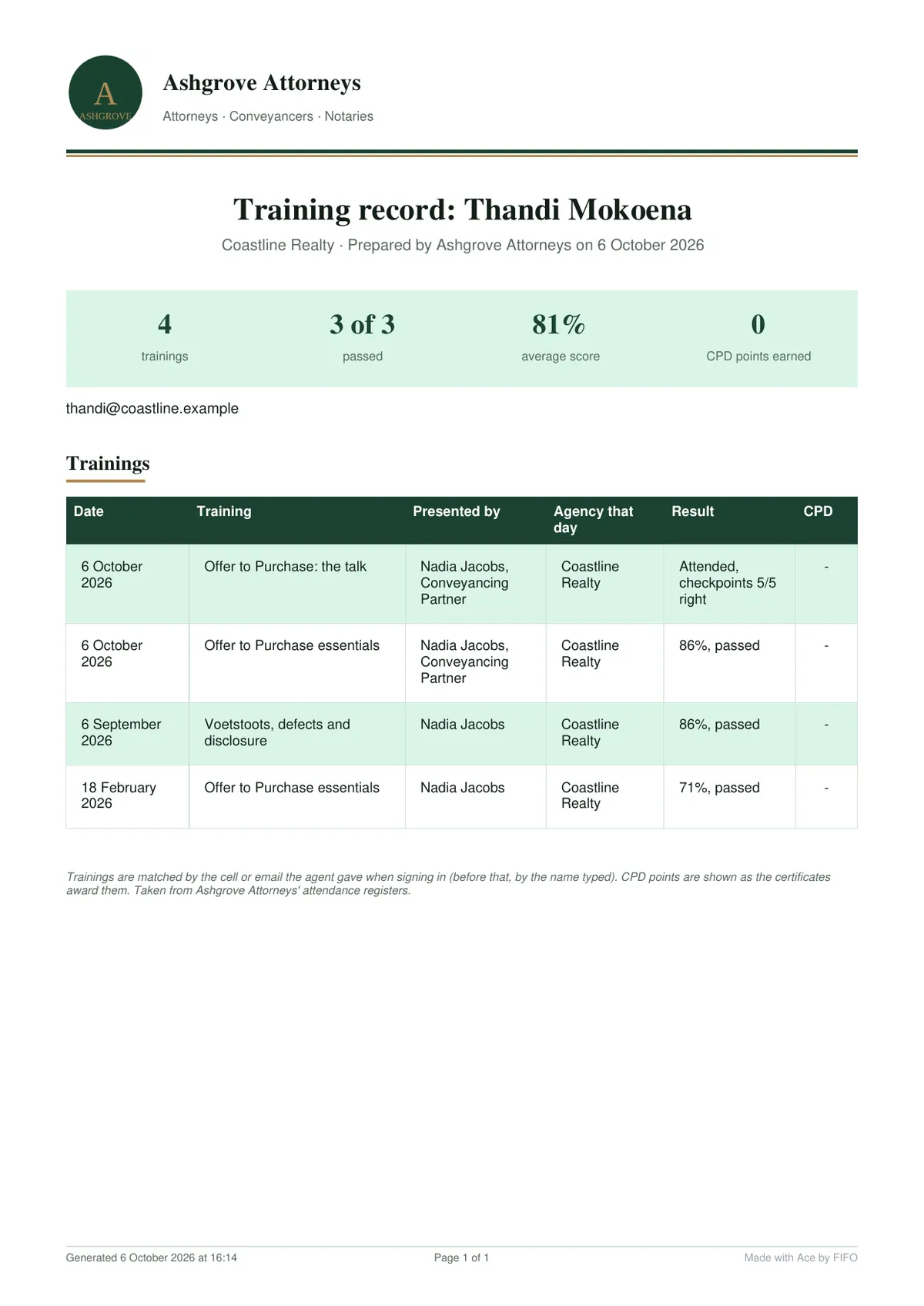
Annexure E, training record for Thandi Mokoena: three trainings, all passed, with the dates, presenters and results.
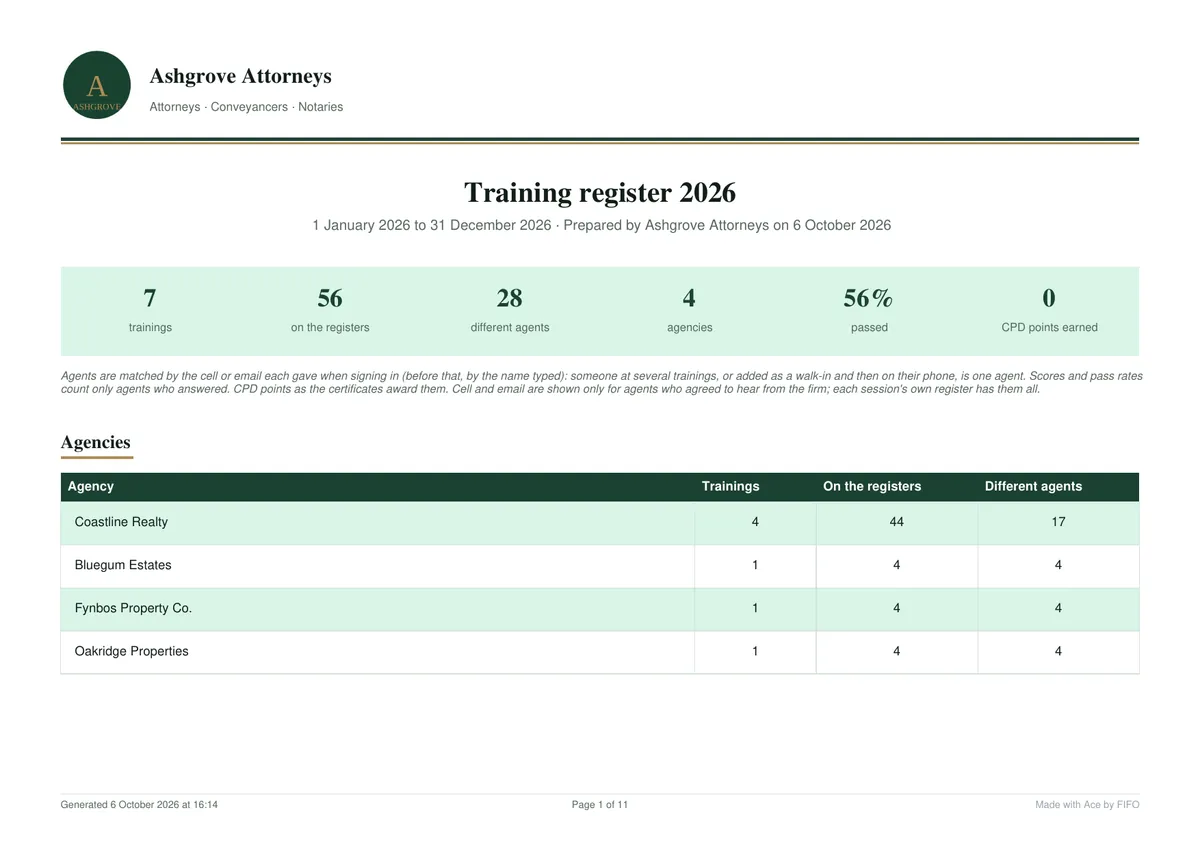
Annexure F, training register 2026: six trainings, 40 on the registers, 28 different agents and four agencies, with each register following.
  1. A
    Attendance register

    Who came, from which agency, signed in on their own phone.

    Sample (PDF)
  2. B
    Certificate

    One per agent, with your firm's name and signature. If the training you give earns CPD points, the certificate can show them.

    Sample (PDF)
  3. C
    Session report

    Scores, rankings, the questions to explain again, feedback and who asked to meet.

    Sample (PDF)
  4. D
    Agency summary

    Every training you gave one agency: who attended, who passed, who to follow up.

    Sample (PDF)
  5. E
    Agent record

    One agent's trainings, scores and certificates over time.

    Sample (PDF)
  6. F
    Year-end pack

    Every register for the year in one PDF.

    Sample (PDF)

2.

One training, start to finish

You present at the agency, as you do now. Ace by FIFO runs everything around your talk.

  1. The week before2.1

    Write your quiz once

    Questions on what agents get wrong in your transfers: the Offer to Purchase, sectional title, bond and transfer timelines. Add pictures, explanations, up to five PDF handouts and checkpoints to ask during your talk.

    Use the same quiz at every agency.

    ace.fifo.systems · Quiz builder
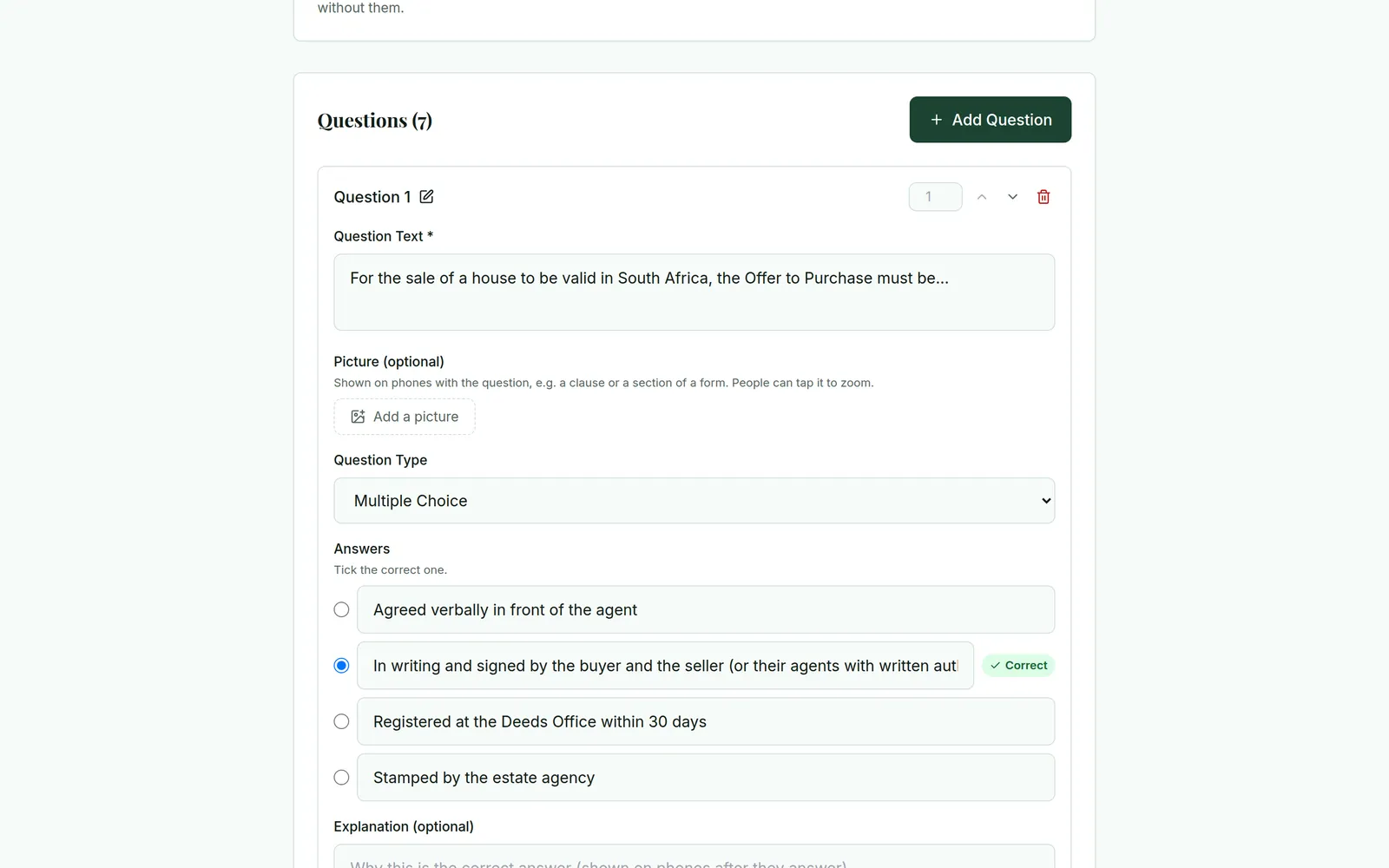
    The quiz builder: question 1, For the sale of a house to be valid in South Africa, the Offer to Purchase must be..., with space for a picture and four answers, the right one marked.
    Your quiz, your material: each question has its right answer and the explanation agents see after they answer.
  2. 2.2

    Agents scan in

    Your welcome screen is on the agency's TV: the training's name, the date, the Wi-Fi and a QR code. Agents sign in on their own phones with their name, agency and cell number or email. No app to install.

    That is your register.

    Handouts you give from sign-in are on their phones straight away, to read without leaving the training.

    No phone? Add them yourself.

    An agent's phone signing in for the attendance register: first name Thandi, surname Mokoena, agency Coastline Realty, a cell number or email, and a tick box to agree that Ashgrove Attorneys may contact them.
    1. Name for the certificate
    2. Agency
    3. Cell or email
    4. Their own consent tick
    Signing in
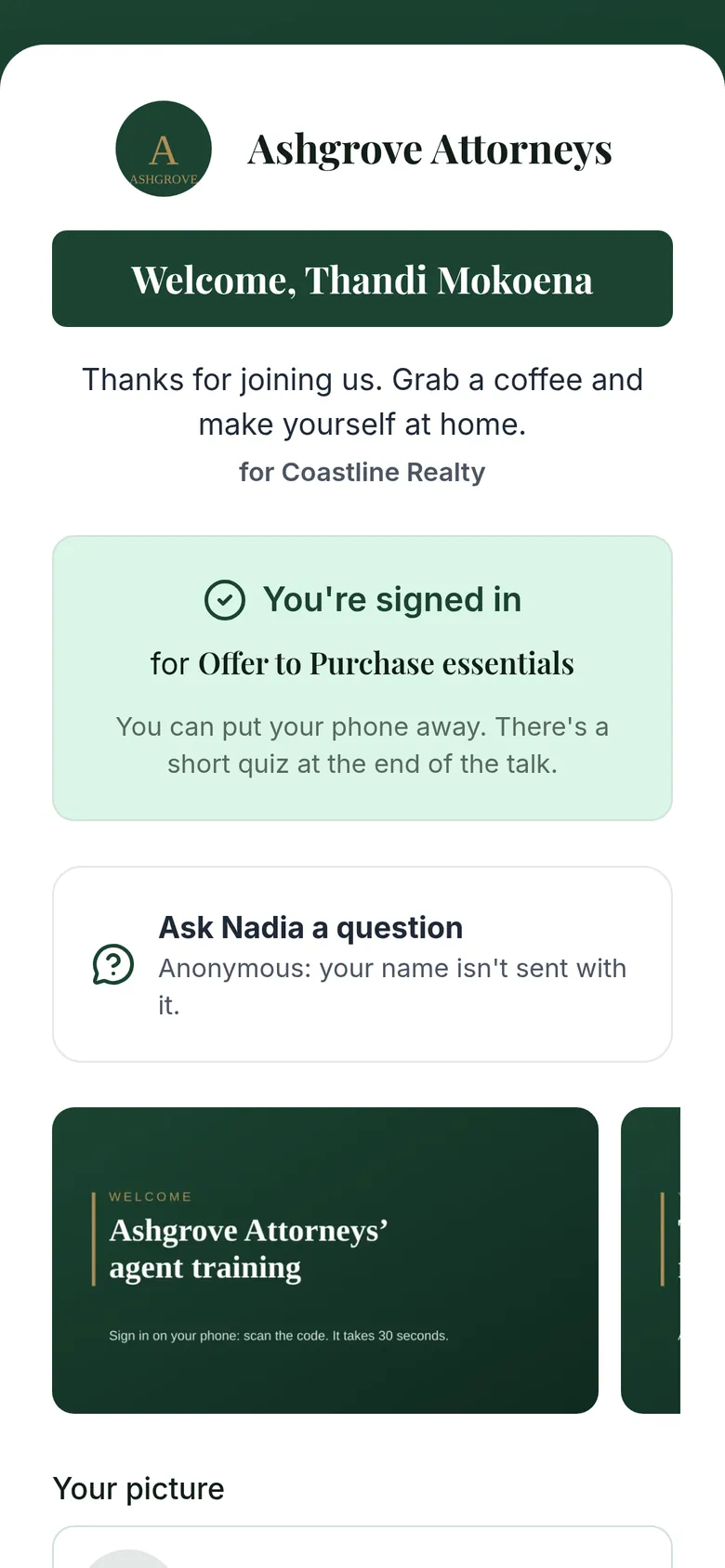
    The phone after signing in: Welcome, Thandi Mokoena. You're signed in for Offer to Purchase essentials, and you can put your phone away.
    “You can put your phone away”
    The agency's TV while agents arrive: Ashgrove Attorneys welcomes you to Offer to Purchase essentials, presented by Nadia Jacobs, Conveyancing Partner, for Coastline Realty; a welcome line; a QR code to sign in for today's register and the joinsession.xyz address with the session's code; a welcome slide; five agents signed in; the Wi-Fi name and password; and a line saying questions can be asked from your phone, anonymously.
    1. Your logo
    2. Presented by … for …
    3. Your welcome line
    4. Your lobby slides
    5. Scan to sign in
    6. Who has signed in
    7. Wi-Fi
    8. Questions go to your phone
    Your welcome screen on the agency's TV. Ashgrove Attorneys is our made-up demo firm.
  3. 2.3 · your talk

    Your slides, their phones

    Switch the TV to your own slides and present as you always do. Ace by FIFO stays off the screen and waits on your phone.

    When a point matters, check that it landed: send a checkpoint question from your phone and it pops up on every agent's phone. Agents can ask you questions too, without their name.

    Checkpoints with a right answer are scored, so your talk can be the quiz: a checkpoint quiz, with no quiz after. The TV shows the scores only if you choose.

    The TV during your talk shows your own presentation. Ace by FIFO's welcome screen waits behind it.
    1. A checkpoint

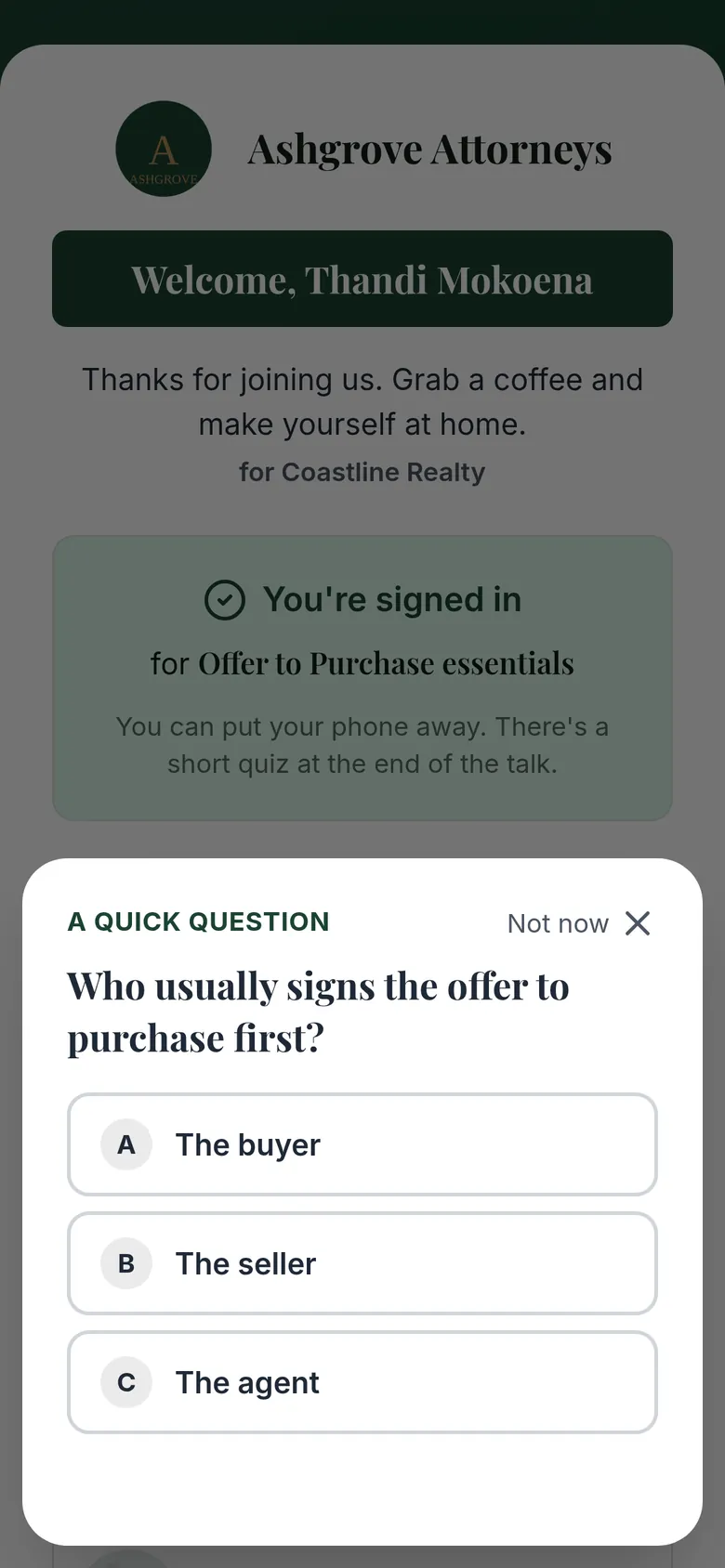
      An agent's phone during the talk: a quick question from the presenter, Who usually signs the offer to purchase first?, with three answers.
      1You send it from your phone. It pops up on every agent's phone.
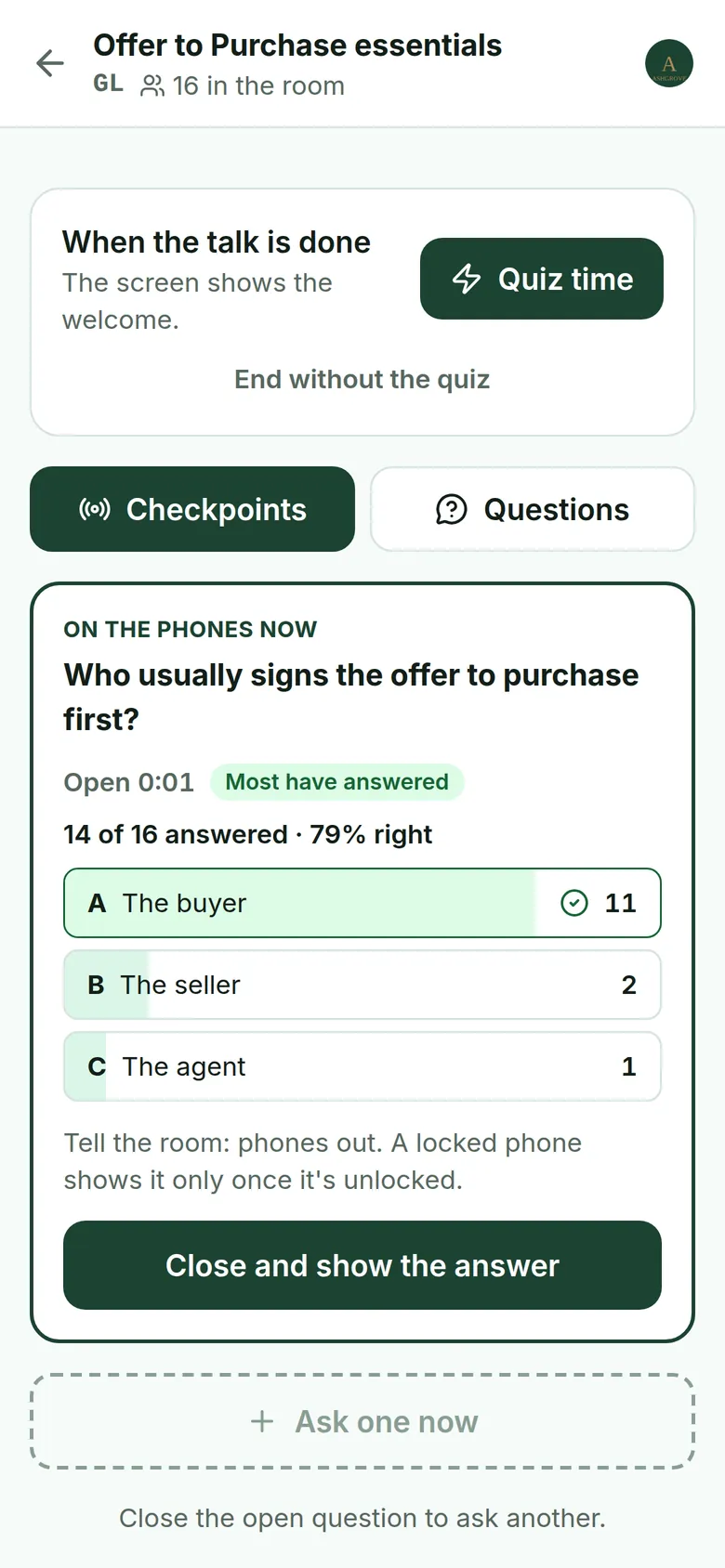
      The presenter's phone: the checkpoint is on the agents' phones now; 14 of 16 have answered, 79% right, with a button to close it and show the answer.
      2Your phone: who has answered and how many got it right. Close it and their phones show the answer.
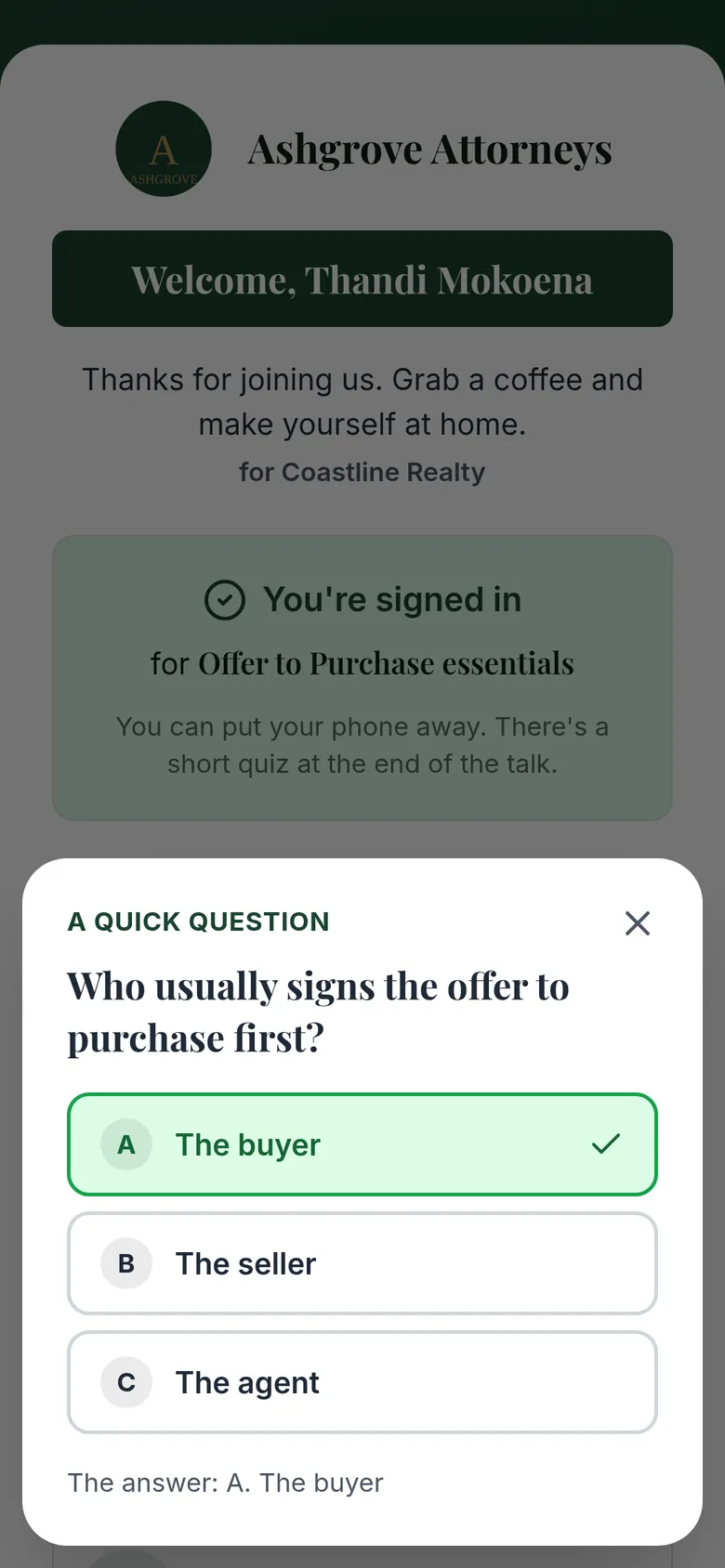
      The agent's phone once the checkpoint is closed: their answer, The buyer, is marked right, and the answer is shown.
      3You close it. Their phones show the answer.
    2. A question from the room

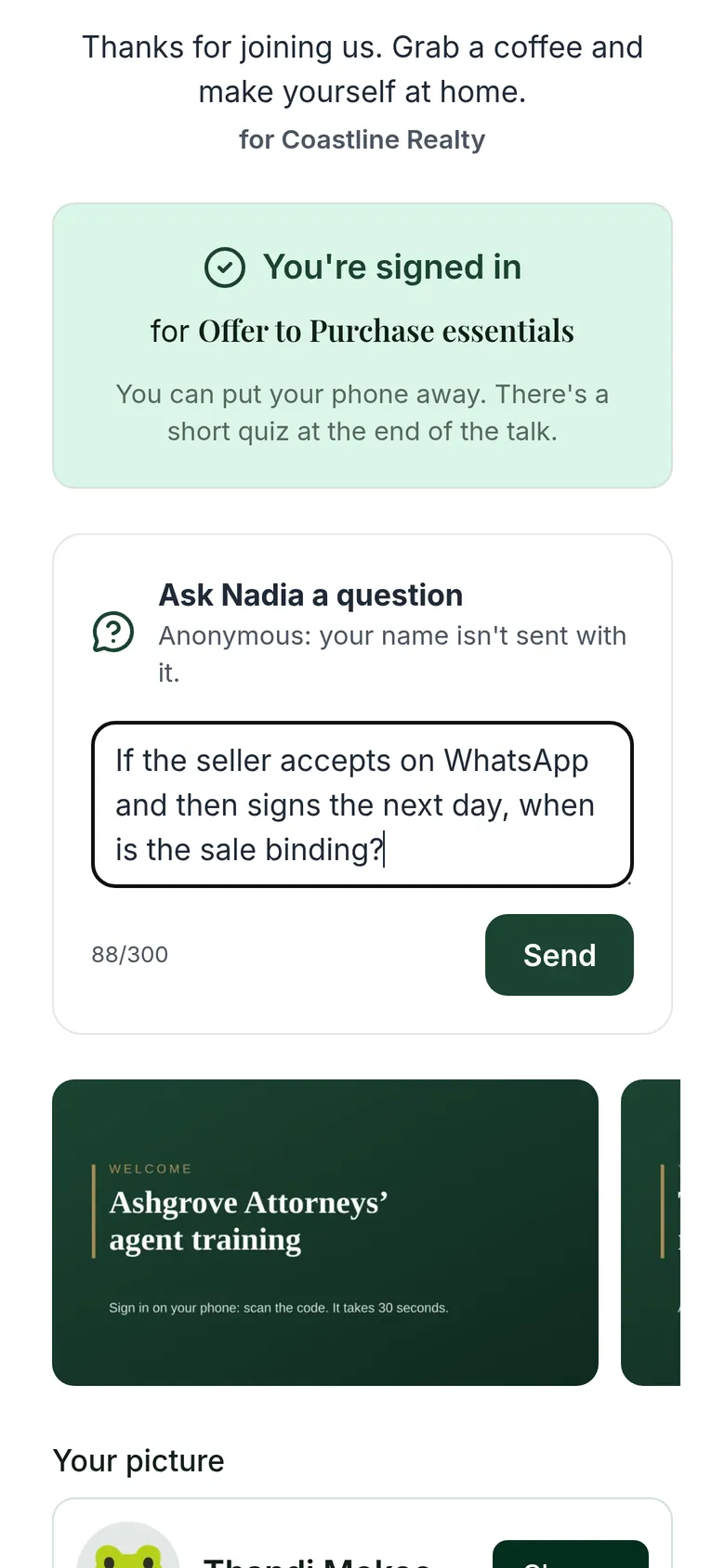
      An agent's phone: Ask Nadia a question, with a question typed in and a note that the agent's name isn't sent with it.
      1An agent types a question. Their name isn't sent.
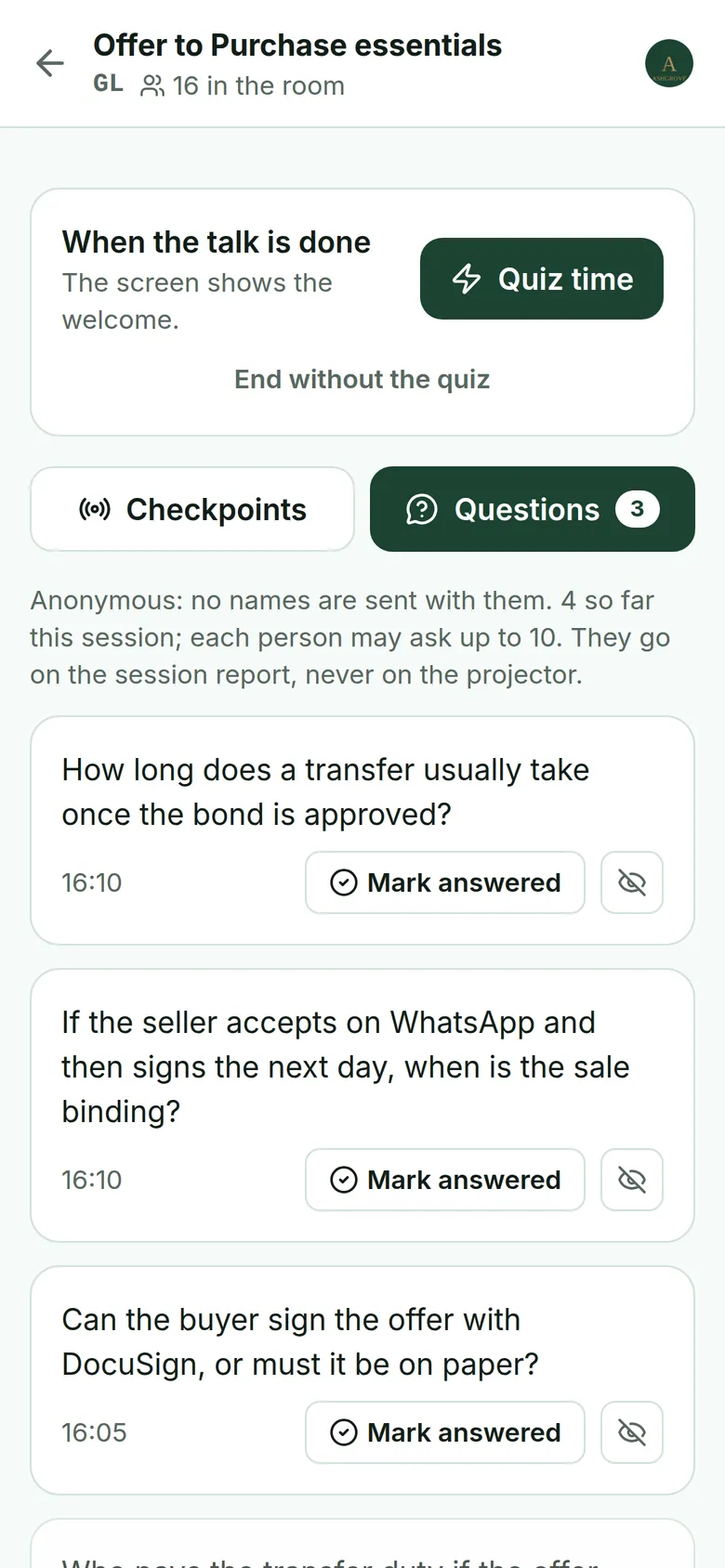
      The presenter's phone: the room's questions, with no names, each with a Mark answered button. They go on the session report, never on the TV.
      2It reaches your phone, never the TV.
    3. The talk is done

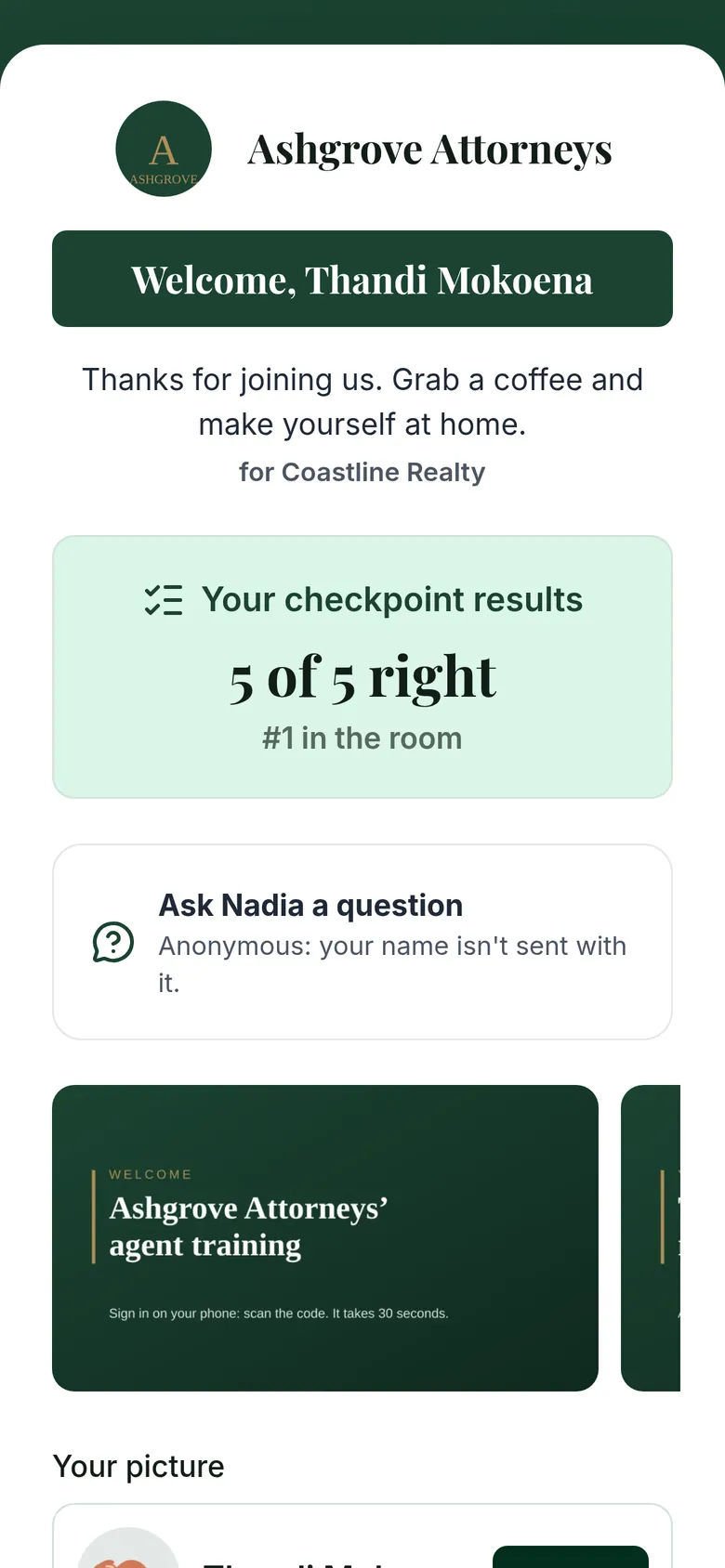
      An agent's phone at the end of the talk: Your checkpoint results, 5 of 5 right.
      Each agent sees their own score.
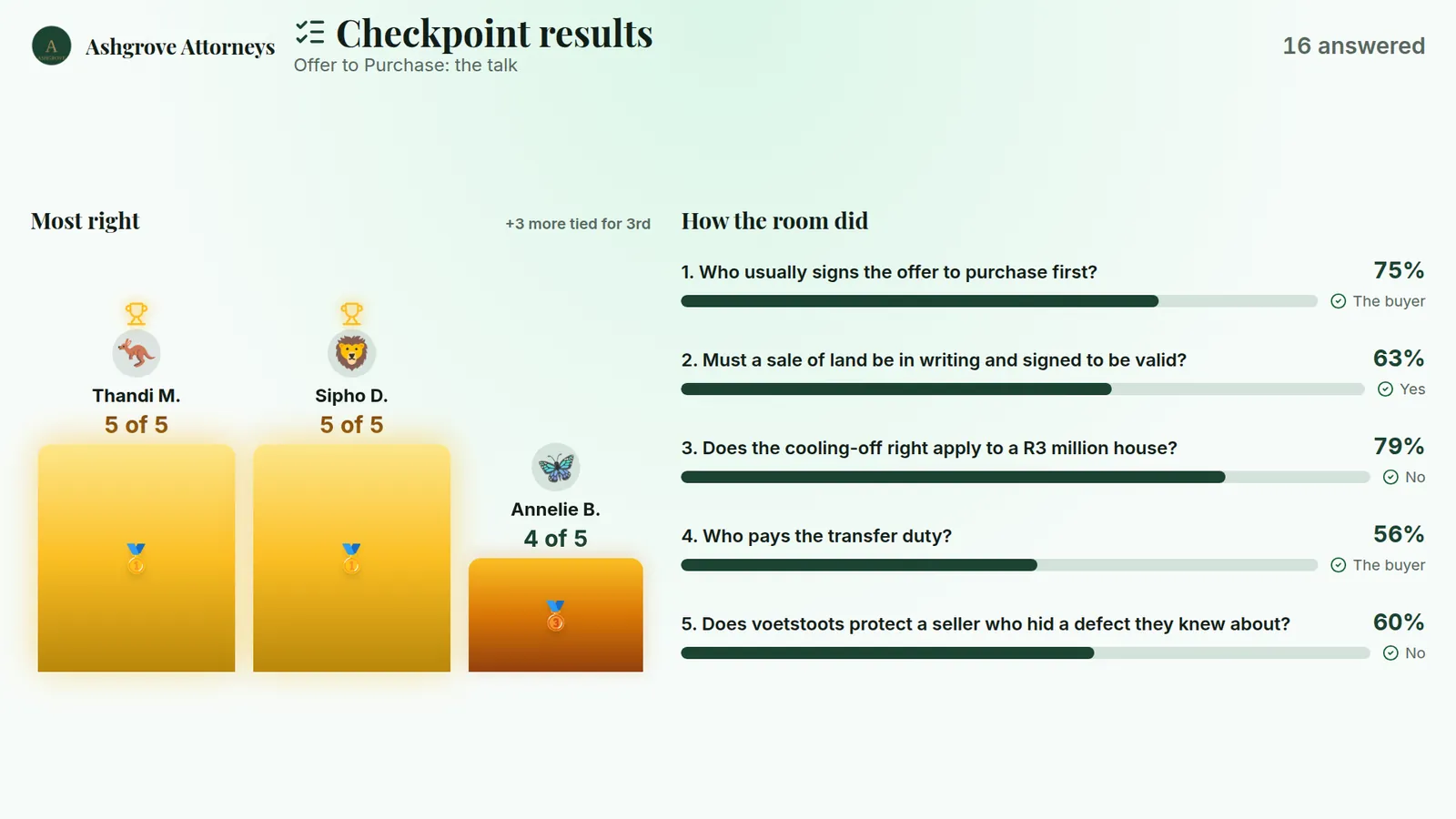
      The TV's checkpoint results: two agents on 5 of 5 share first place, and a bar per checkpoint with the share of the room that got it right and the right answer.
      The TV shows who got the most right only if you choose it when you start.
  4. 2.4

    A quiz after the talk, if you want one

    Two ways to quiz: a checkpoint quiz during your talk, or a quiz after it. You choose when you start, and some days the register is all you need.

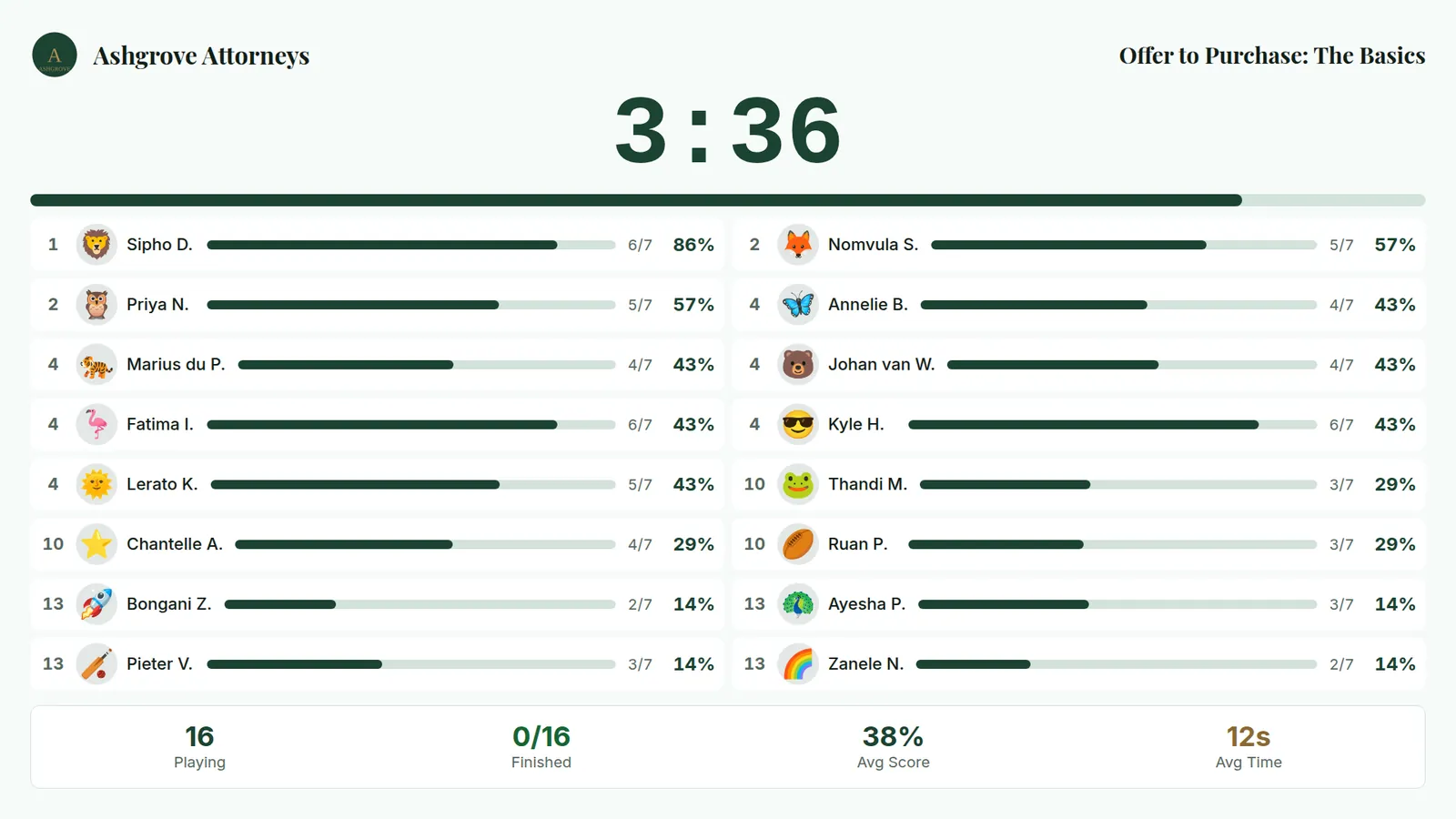
    With a quiz, one tap starts it. Agents answer on their phones at their own pace and see the explanation after each answer, the TV shows who is done, and a podium crowns the winners.

    During the quiz the TV shows progress, never the questions.

    The TV during the quiz: 3 minutes 36 seconds left, and sixteen agents, each with a progress bar and a score. The questions themselves stay on the phones.
    1. Time left
    2. How far each agent is
    3. Who has finished
    The TV while they answer.
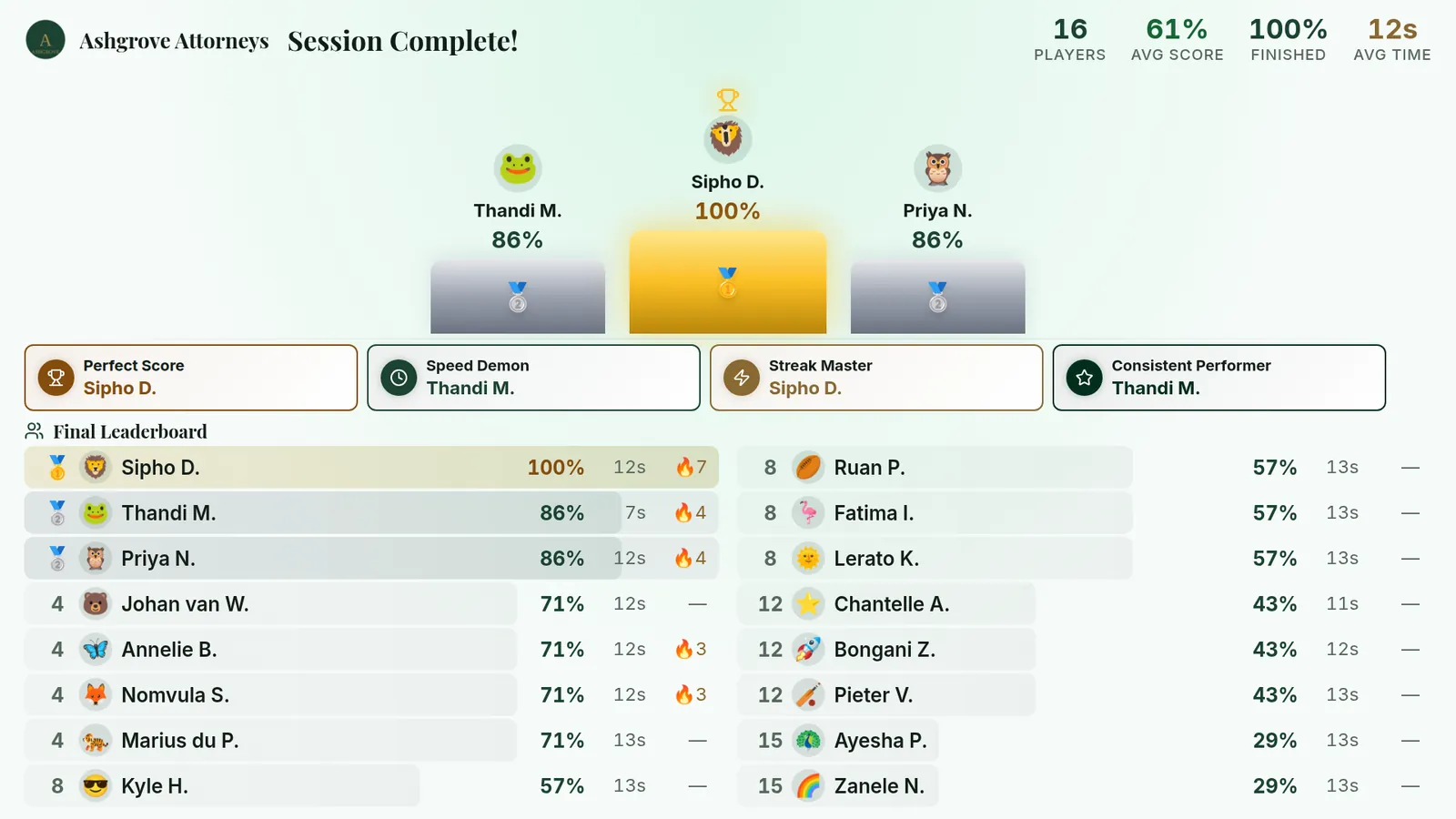
    The TV after the quiz: a podium with Sipho D. first on 100% and a tie for second, the awards, and the full leaderboard.
    The podium, the awards and every agent's score.
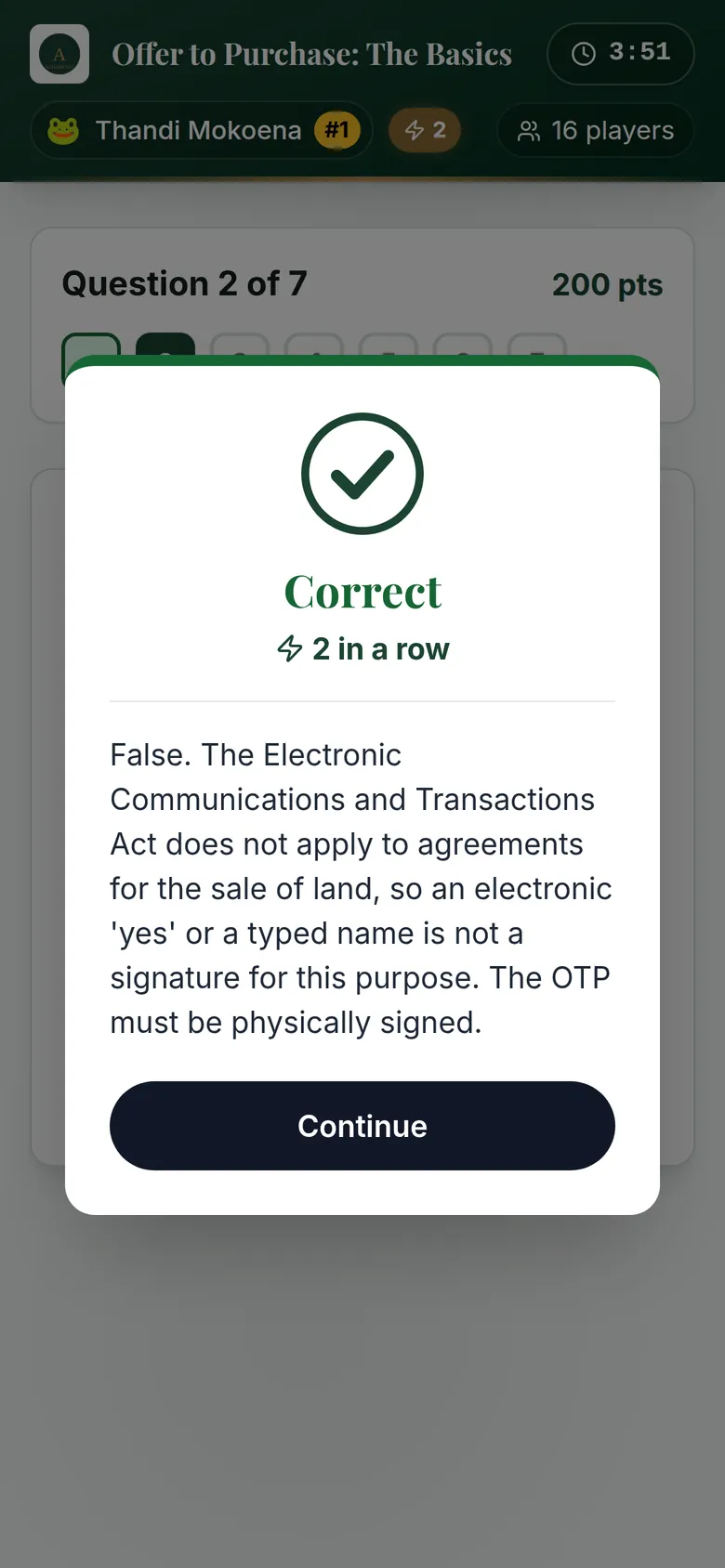
    An agent's phone after answering: Correct, two in a row, with the explanation that the Electronic Communications and Transactions Act does not apply to agreements for the sale of land.
  5. 2.5

    Before they leave

    Each agent sees their score and downloads their certificate, with your firm's name on it. Nobody makes certificates afterwards.

    They can save your contact card, open your transfer cost app, rate the training and tap “Let's meet”.

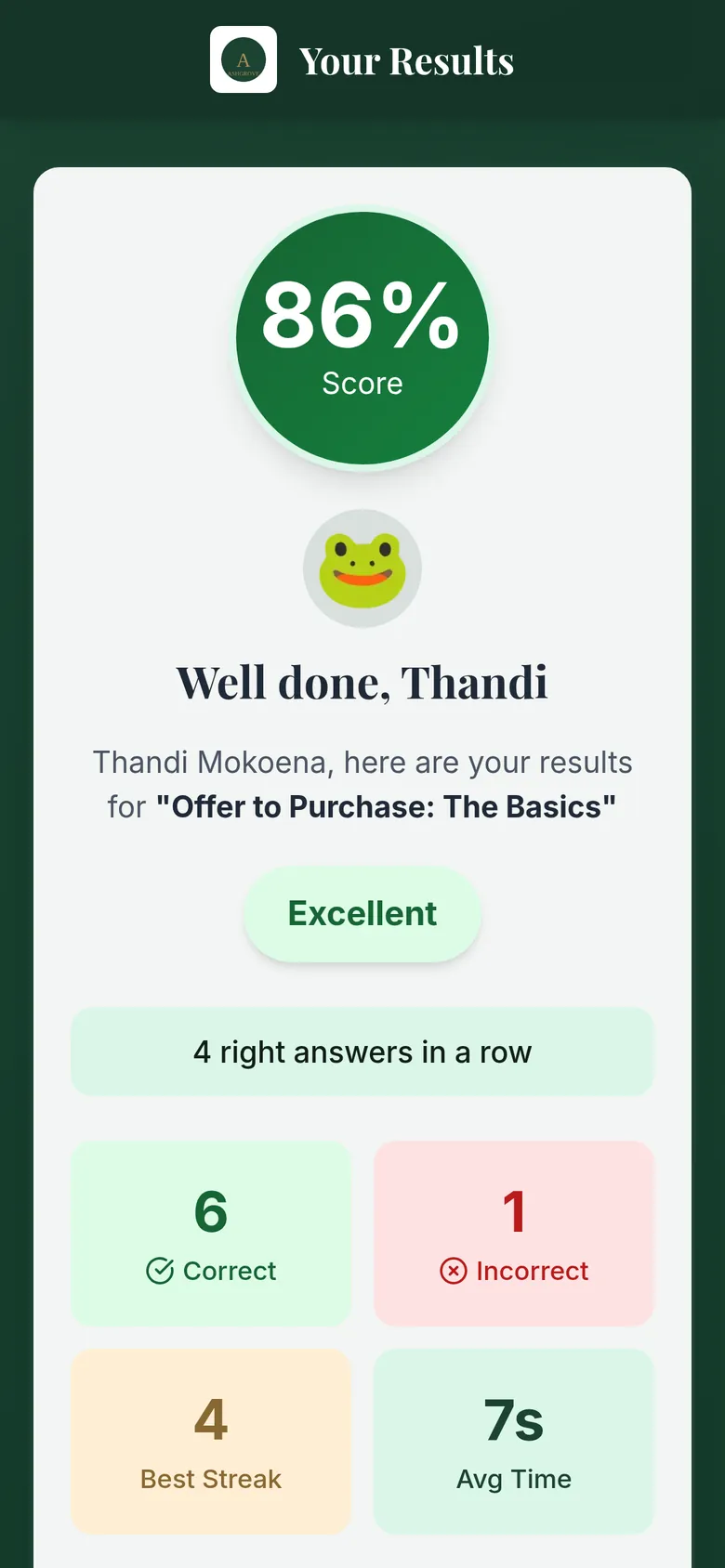
    An agent's results: 86%, Well done, Thandi, Excellent, 6 correct and 1 incorrect, and a Download Certificate button.
    1. Their score
    2. Their certificate
    Their score and their certificate
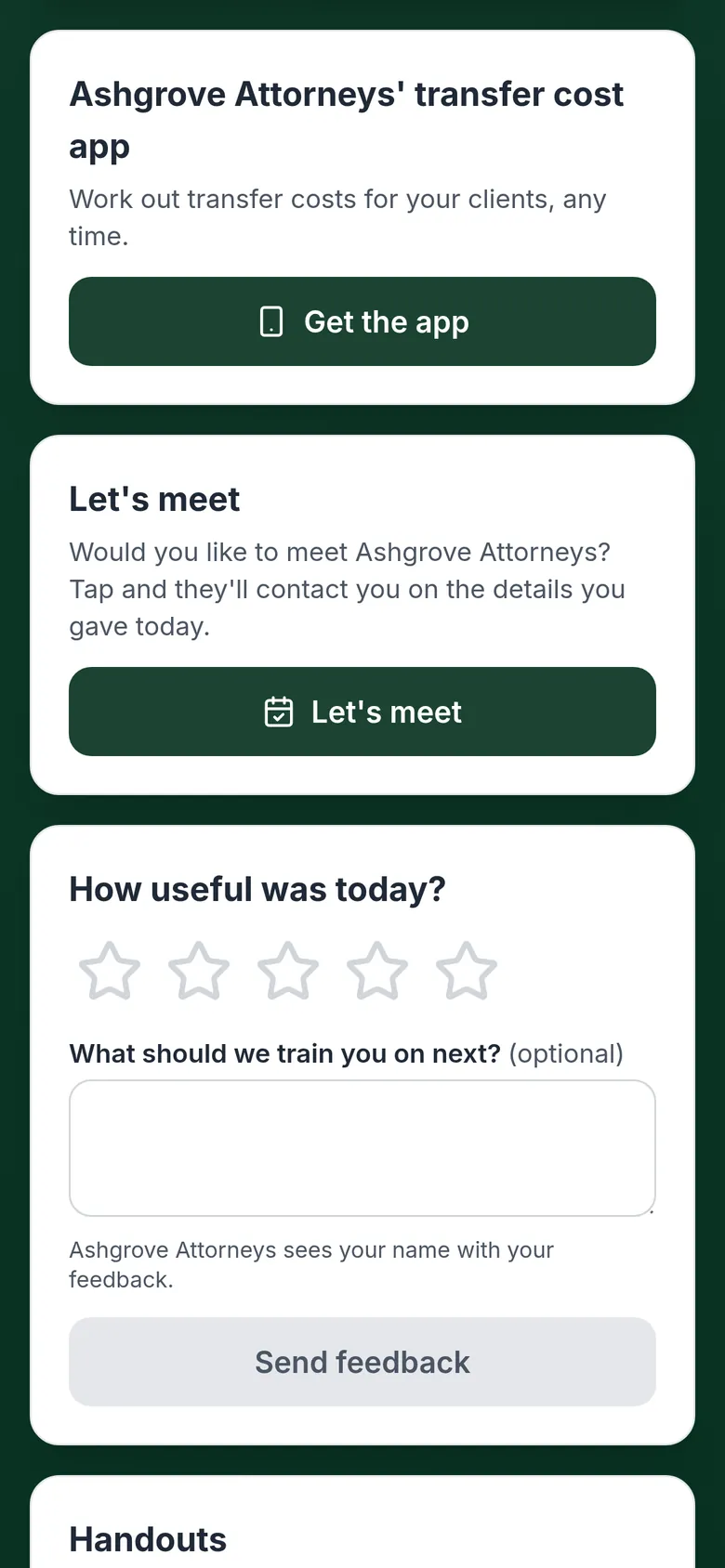
    Further down the results: Ashgrove Attorneys' transfer cost app with a Get the app button, a Let's meet button, and stars to rate the training.
    Your app, “Let's meet”, feedback
  6. 2.6

    Back at the office

    The register, the scores, the feedback and who wants to meet are already in your account, as PDFs under your letterhead.

    ace.fifo.systems · Session report
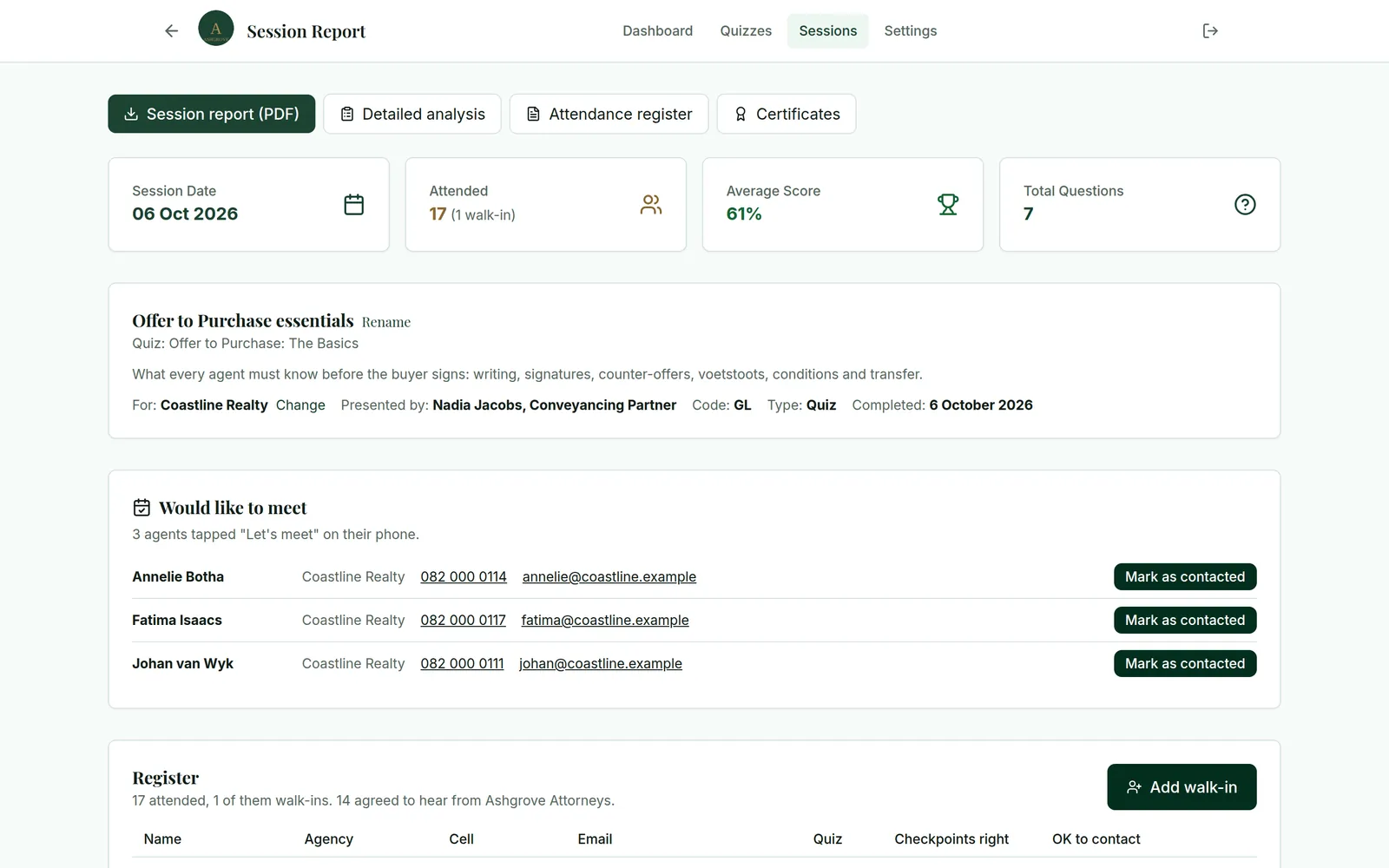
    The session report in your account: buttons for the session report, detailed analysis, attendance register and certificates; 17 attended, one of them a walk-in; a 61% average; the training's details; three agents who would like to meet, each with a Mark as contacted button; and the register.
    1. Who came
    2. Who wants to meet you
    3. The register
    The session report in your account.
    The attendance register PDF under Ashgrove Attorneys' letterhead: each agent's name, agency, cell and email, when they joined, their quiz score and checkpoints, and whether they agreed to be contacted.

    And the register it prints, under your letterhead.

3.

What “Ace” stands for

Definitions. In this page, and in your account:

3.1

“Attention”

means agents take part instead of sitting through two hours of slides: checkpoint questions that count, anonymous questions and a quiz they want to win.

3.2

“Competence”

means you see what they actually learned: each agent's score, the questions the room got wrong, the wrong answer most of them picked, and what is worth going over again.

3.3

“Evidence”

means proof the training happened: a register, a certificate for every agent, a report per session, a summary per agency and a year-end pack.

4.

Your name on all of it

Your logo and colours on the agency's TV, every agent's phone and every certificate. FIFO sets them up once; Ace by FIFO stays out of the way.

4.1

Try it

Choose one of our made-up firms, or your own colours, and see the welcome screen, an agent's phone and the certificate change.

The agency's TV while agents arrive, rebuilt on this page with the colour rules Ace by FIFO uses.
An agent's phone, before they leave.
The certificate: one per agent, A4 landscape.
Set by FIFO, once
Your logo, brand colour, accent and font style
Yours to change, any time
Your welcome line, lobby slides, contact card and tone
The same at every firm
Right answers in green, wrong answers in red

Brand kit

Set up once by FIFO
Firm made-up firms
Brand colour #1E4D3A
Accent colour #B08D57
Font style
Tone the words on agents' phones

Whatever colours you choose, every word stays easy to read: where a colour carries text, it's darkened just enough.

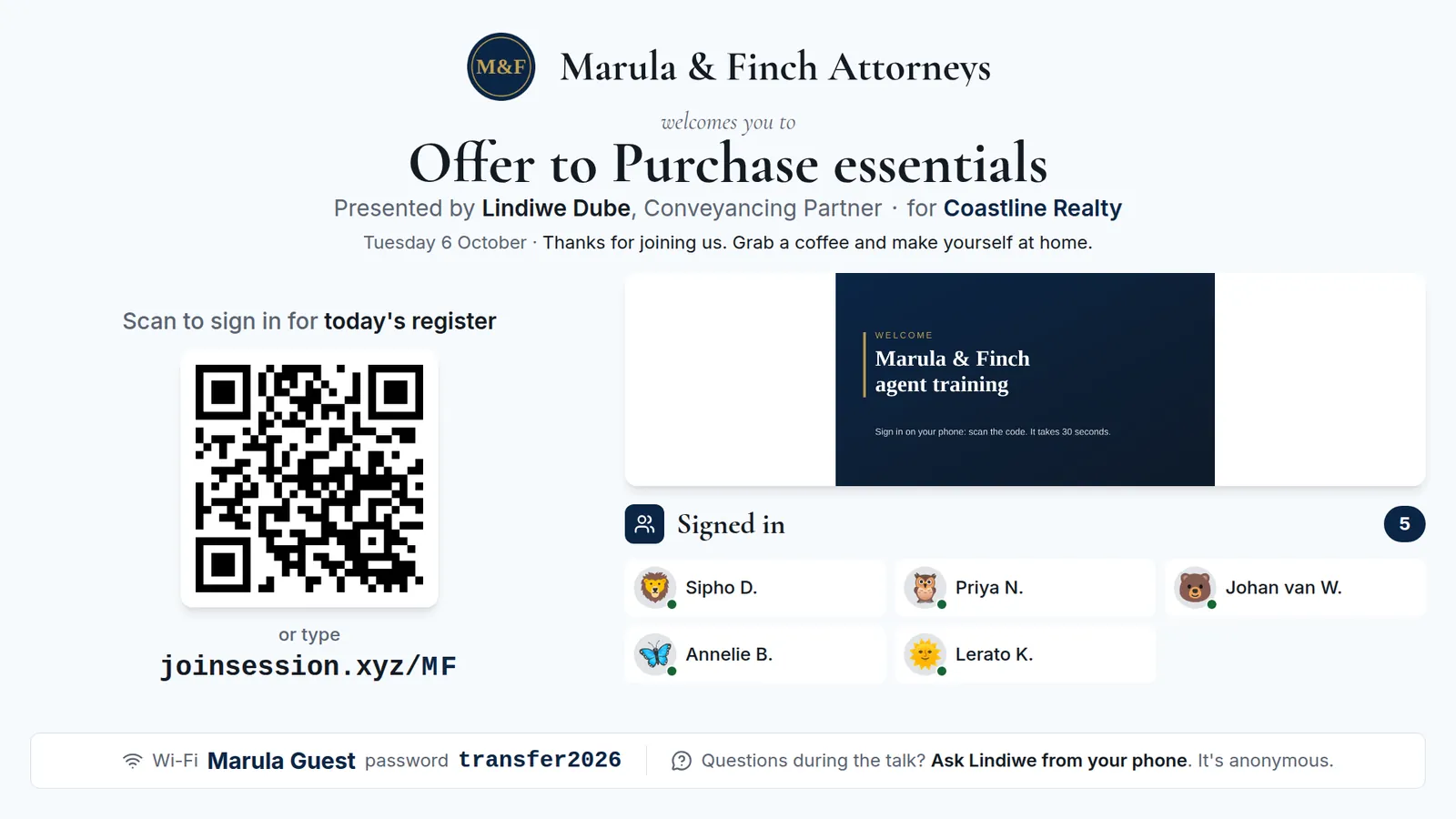
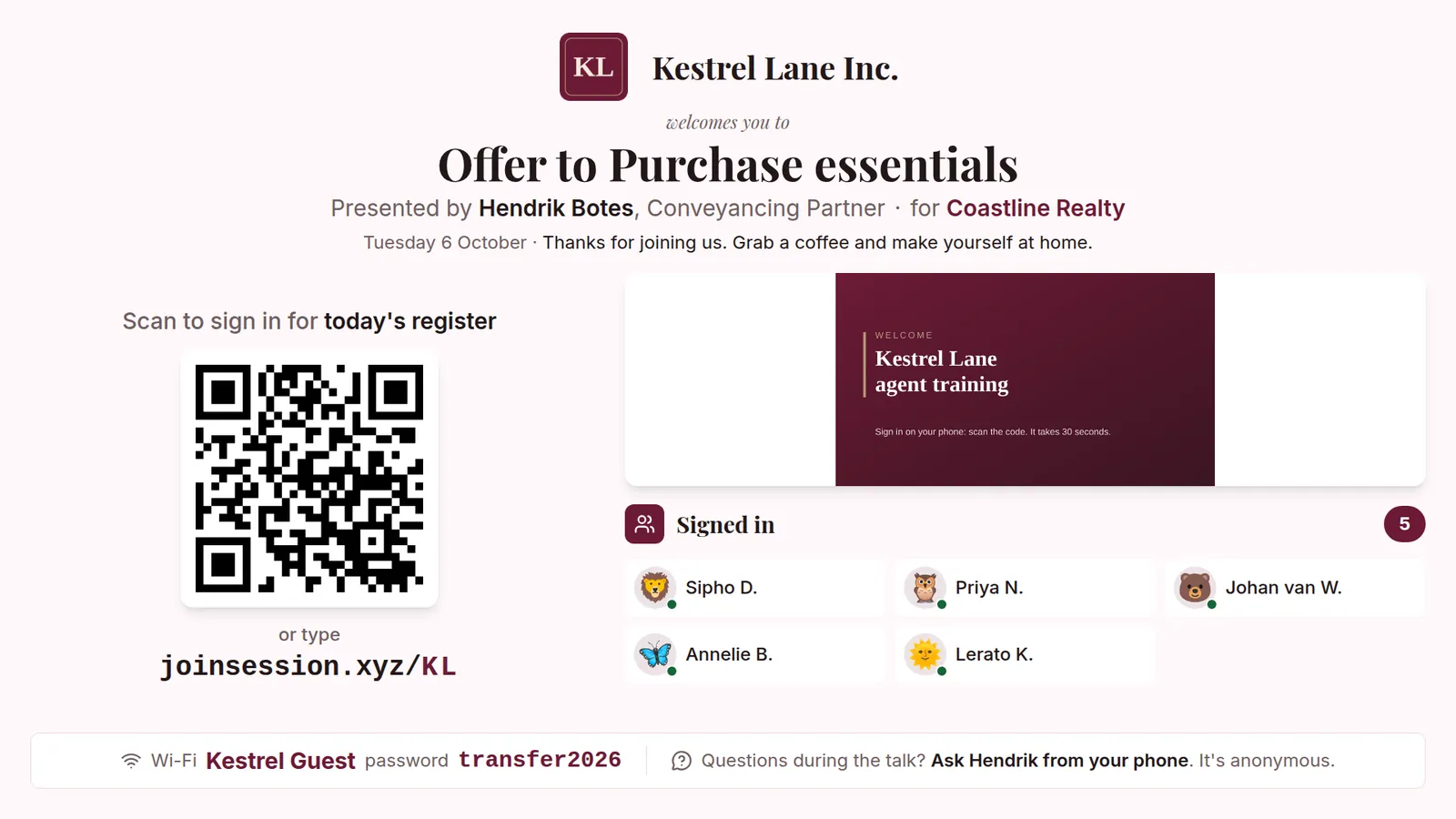
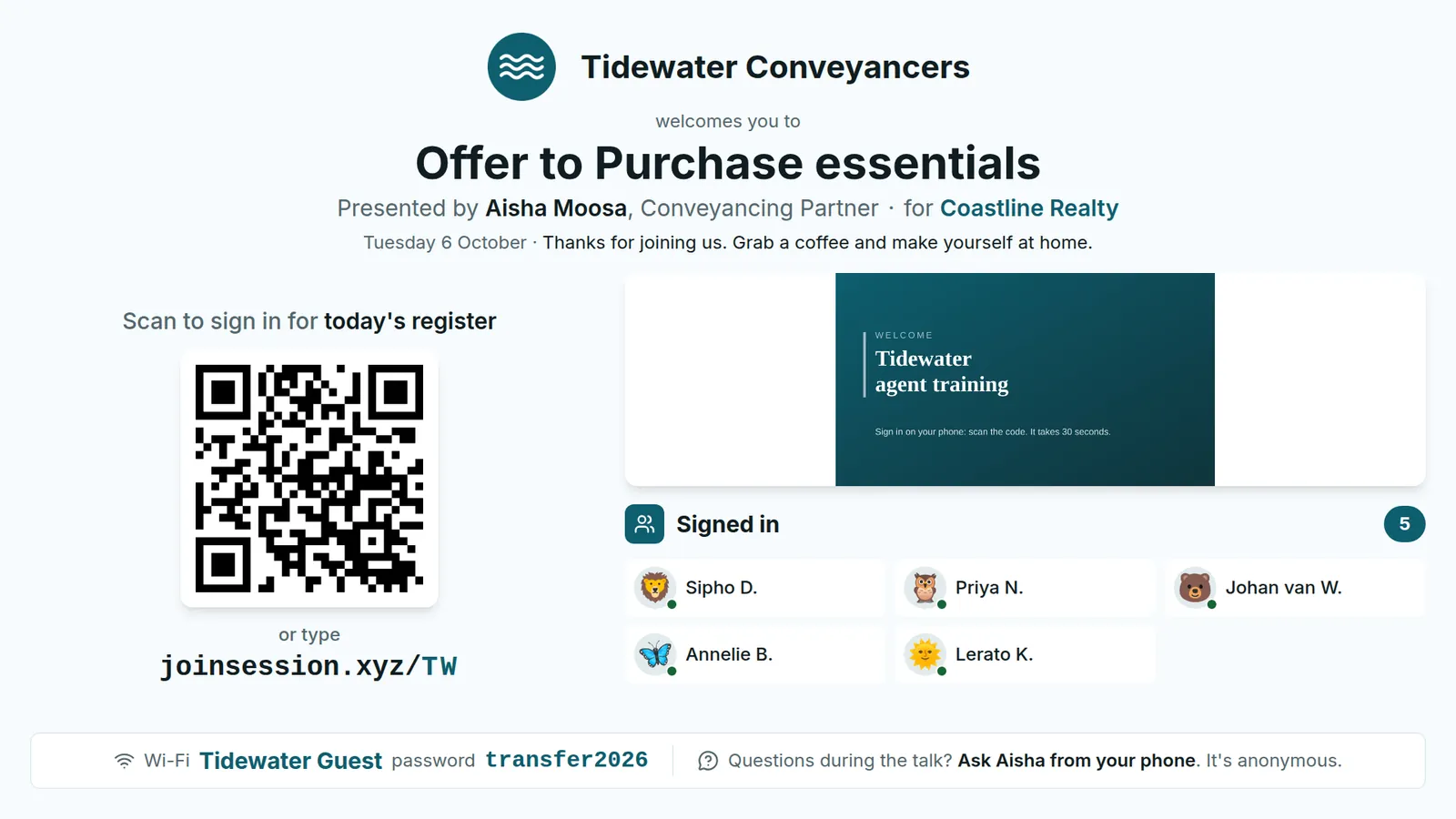
These are real screens from Ace by FIFO. The same training, for three more made-up firms.

The welcome screen for Marula & Finch Attorneys: navy and gold, formal serif headings, presented by Lindiwe Dube for Coastline Realty.
Marula & Finch Attorneys, a made-up firm
The welcome screen for Kestrel Lane Inc.: burgundy, classic serif headings, presented by Hendrik Botes for Coastline Realty.
Kestrel Lane Inc., a made-up firm
The welcome screen for Tidewater Conveyancers: teal and coral, modern sans-serif headings, presented by Aisha Moosa for Coastline Realty.
Tidewater Conveyancers, a made-up firm

4.2

Your app in front of every agent

If your firm has the FIFO Law transfer cost app, every agent is offered it at the end of the training. You see how many opened the link.

4.3

People who want to talk

Agents who'd like to meet you tap “Let's meet”. You see who, with their details, on the session report.

4.4

Contacts you may use

Agents choose whether you may contact them. Those who agree are on one list, ready to export.

4.5

A summary for the principal

Every training you gave the agency: who came, how they did, and who to follow up (didn't pass, joined but didn't answer, missed the latest training).

5.

One price for your firm

How buying works

  1. 5.1A 15-minute demo on a video call.
  2. 5.2Sign the subscription online, or accept a quote. Then an invoice.
  3. 5.3We set up your firm with your logo, colours and contact card, usually in a business day.
  4. 5.4Write your first quiz, and give your first training.
Fee scheduleFIFO Solutions (Pty) Ltd

Ace by FIFO, annual subscription, per firmR6,000.00

Your firm's brand on every screen and documentincl.

Unlimited trainings and agentsincl.

Every report, register and certificateincl.

Set-up and support from the founderincl.

Fee per agentnil

Fee per sessionnil

Fee per presenternil

Per year, for your firmExcl. VATR6,000

Paid by EFT against an invoice.

6.

Questions attorneys ask

6.1

What does the agency need?

A TV, projector or any screen you can plug your laptop into; the presenter view fits it. Agents use their own phones, on the agency's Wi-Fi or their own data.

6.2

Do agents need an app?

No. They scan the QR code, or type joinsession.xyz and the two-character code on the screen. Next time their phone remembers them, and if the Wi-Fi drops, their answers are sent when it comes back.

6.3

Who writes the quizzes?

You do, on your own material. We help you set up your first one. A sample quiz is in your account to start from.

6.4

How soon can we give our first training?

Usually within a week. We set up your firm with your logo, colours and contact card in about a business day; the rest is the time it takes you to write your first quiz.

6.5

Can I run it without a laptop at the front?

Yes. Start the welcome screen on the agency's TV, then run the training from your phone.

6.6

Do we have to run a quiz?

No. When you start a training, choose a quiz after the talk, a checkpoint quiz during it, or just the register. The TV shows checkpoint scores only if you choose it.

6.7

What about POPIA?

Agents see what they share and tick their own consent. Their details are kept for your firm and Ace by FIFO doesn't share them. The room only ever sees “Sarah M.”; full names stay on your register and certificates. Read the privacy notice.

6.8

Does Ace by FIFO give CPD points?

No. If the training you give earns CPD points, the certificate can show them.

6.9

What happens to our records?

They stay in your account while you subscribe, and the year-end pack puts a year's registers in one PDF. If you leave, you have 90 days to download them; then they're deleted.

6.10

What does it cost?

R6,000 a year for your firm, excl. VAT, paid by EFT against an invoice. Everyone in your firm who presents can use it: no fee per agent, per session or per presenter.

FIFO SolutionsAce by FIFO
FIFO Solutions (Pty) Ltd
Durbanville, Western Cape

2 October 2026

To the attorney who presents to estate agents,

Re: See it before you take it to an agency

The quickest way to judge Ace by FIFO is to sit where an agent sits. We'll run a live session with you on a video call: you join on your phone and play it the way an agent would.

Afterwards I'll show you the register and the report it leaves behind. Fifteen minutes; send me a WhatsApp and we'll find a time.

Regards,

Riaan Potas Director, FIFO Solutions (Pty) Ltd 082 525 4011 · riaan@fifo.systems
Book a demo WhatsApp